Editing Documents
DocGraph documents are real HTML files, and the editor works directly on them — click into any paragraph, heading, or list and type. The experience is designed to feel like a native notes app.
The basics
Section titled “The basics”- Click and type. The caret goes where you click; edits commit automatically.
- Enter continues lists, splits paragraphs, and exits a list when pressed on an empty item — the way you’d expect from apps like Notion or Obsidian.
- Shift+Enter starts a new line inside the same paragraph or list item, without splitting it. In a
.mdnote this works in paragraphs; in a list item or heading it just leaves the block. - Backspace at the start of a block merges it with the previous one; Delete at the end of a block pulls the next one up.
- Slash menu. Type
/to insert lists, code blocks, dividers, tables, diagrams and more — see Diagrams, Callouts & Code. Headings come from typing#, not from this menu.
Formatting
Section titled “Formatting”Select text and a toolbar appears — bold, italic, inline code, strikethrough, underline, text colour, highlight, links, and an AI menu. The usual shortcuts work too (⌘B, ⌘I, ⌘`, ⌘⇧X for strikethrough, ⌘⇧H for highlight). Typing ~~text~~ also strikes it through.
In a .md note the toolbar keeps bold, italic, inline code, strikethrough (written ~~text~~), highlight (written ==text==, one colour), links and the AI menu; underline and text colour are HTML-only, because Markdown has no syntax for them.
In an HTML note, when the selection is a single run of text, the toolbar also has Encrypt this passage (the key icon), which replaces it on disk with an encrypted marker — see Encryption.
Paste a URL over selected words and they become a link to it, in either kind of note. ⌥↑ / ⌥↓ move the block your cursor is in up or down — a heading takes its section with it.
Colours
Section titled “Colours”Text color and Highlight each open a palette of eight swatches. A Default chip in the same popover clears the colour again.
| Text color | Highlight |
|---|---|
| Red, Orange, Amber, Green, Teal, Blue, Violet, Pink | Yellow, Green, Blue, Pink, Orange, Violet, Teal, Gray |
Text colours are saturated so they read on a light or dark page; highlights are pastels so body text stays legible on top. Once a run is underlined, an Underline color control appears beside them, with the same eight text colours. The same three palettes are in the right-click menu (below).
Keyboard shortcuts
Section titled “Keyboard shortcuts”With text selected:
| Shortcut | Action |
|---|---|
⌘B / ⌘I | Bold / italic |
⌘U | Underline (HTML notes) |
⌘` | Inline code |
⌘⇧X | Strikethrough |
⌘⇧H | Highlight (toggles the default colour) |
⌘L | Add or edit a link — opens the link prompt (with an optional Link type field, in HTML and Markdown notes). On an existing link the prompt has Apply and Remove; Remove unlinks the text and keeps the words |
⌘\ | Clear formatting on the selection (HTML notes) |
With nothing selected, ⌘B, ⌘I and ⌘` insert the Markdown delimiters at the cursor, and ⌘L inserts []() with the cursor inside, ready to type.
With the cursor anywhere in a block:
| Shortcut | Action |
|---|---|
⌘⌥0 | Turn the block into a paragraph |
⌘⌥1 to ⌘⌥6 | Turn the block into a heading of that level |
⌘⌥7 / ⌘⌥8 | Turn a paragraph or heading into a bulleted / numbered list |
⌥↑ / ⌥↓ | Move the block up or down |
Tab / ⇧Tab | Indent / outdent a list item |
⌘Enter | Tick or untick the to-do the cursor is in |
⌘⇧P | Open the properties window for the line (HTML notes) |
⌘F | Find in the note — see below |
⌘A | Select progressively: the block’s text, then the enclosing container, then the whole page |
⌘Z / ⌘⇧Z | Undo / redo |
⌘S | Save now (see Autosave) |
Changing a block’s type
Section titled “Changing a block’s type”Select some text and the leftmost control in the selection toolbar is a block picker: Paragraph and Heading 1 to Heading 6, each labelled with its ⌘⌥0–⌘⌥6 shortcut. The right-click menu has the same list under Turn into. With nothing selected, the shortcuts act on the block the cursor is in. Headings come from typing # as well — the slash menu doesn’t list them.
Moving and deleting blocks
Section titled “Moving and deleting blocks”Hover a block and a small handle appears in the left margin. Drag it to reorder — a heading carries its whole section with it, and a line marks where the block will land. Hovering the handle shows Added and the time when the line was time-stamped. Click it (without dragging) for a menu:
- Properties… opens the block’s properties.
- Move to note… files the line into another note — see below.
- Delete removes the block, or the whole section when the block is a heading.
Move a line to another note
Section titled “Move a line to another note”Click a line’s handle and choose Move to note…. A picker lists the notes you’ve recently filed or captured into; type to search other note names. Pick one and the line moves to the end of that note, marked filed: true, and the note joins your recent targets. The search lists HTML notes only, never the page you’re on. Table, chart and query blocks don’t have the entry. If the page changed underneath you, nothing is written and a message says why. Two pages change, so undoing it takes one ⌘Z in each.
Pasting
Section titled “Pasting”In an HTML note:
- Web content — copied from a page, an email or a Google Doc — keeps its structure. Headings, lists, quotes, code, tables, images and links arrive as the matching blocks, not as one styled blob.
- Plain text is inserted as written. If it looks like Markdown (it starts a line with
#,-,1.,>, a fence or a|table) it is converted to blocks. Otherwise each line break is kept as a line break inside one paragraph, and blank lines separate paragraphs. - Inside a code block, the text goes in verbatim — no conversion.
- A URL pasted over selected words turns them into a link.
- An image is saved into the vault — see Images.
In a Markdown note:
- Web content with links, images, tables or several blocks is converted to Markdown as it lands — headings, lists and quotes become their Markdown forms, and links are kept as
[label](url). A one-line paste keeps its bold, italic, code, strikethrough and links the same way. - A URL pasted over selected words turns them into a
[label](url)link. - An image is saved into the vault and written as
.
Copying and dragging text
Section titled “Copying and dragging text”Copying from a note keeps its formatting, so it pastes as formatted text into other apps and as plain text where formatting isn’t accepted; a whole heading copied and pasted back stays a heading. Pasted text that carries a text, highlight or underline colour keeps it in an HTML note.
Drag selected text to move it within the page; hold ⌥ while dropping to copy it instead.
Right-click menu
Section titled “Right-click menu”Right-click in the page for a menu that adapts to what’s under the pointer:
- Over a selection, a row of bold, italic, underline, strikethrough, code and link buttons, then Turn into, Text color, Highlight, Underline color (only on underlined text) and, on HTML notes, Encrypt this passage. On a
.mdnote the colour and underline entries are left out. - Cut (when the selection can be cut), Copy (when there is one) and Paste.
- Dictate here, when voice is set up.
- Over a selection, with AI on: Ask about this, Explain this, Rewrite this and Make tasks from this.
- Copy link to block, which gives the block an id and copies a link to it; hold
⌥to copy it as a Markdown link. - Remove chart, Remove table, Remove callout, Remove divider, Remove code block, Remove list or Remove blank line, when you right-clicked one of those.
Markdown shortcuts while typing
Section titled “Markdown shortcuts while typing”Markdown shorthand converts as you type. In a .md note what you type already is the Markdown, so the line simply renders in place. The line-start triggers work at the start of a paragraph or heading, and fire when you type the space after them. A line holding only --- or *** becomes a divider:
| Type | You get |
|---|---|
# to ###### | A heading of that level |
> | A quote |
- or * | A bulleted list |
1. , 3. (any number) | A numbered list |
[ ] , [] , [x] (optionally after - or * ) | A to-do item, unchecked or checked |
``` then a space | A code block |
--- or *** | A divider |
Inline spans convert when you type the closing delimiter: **bold** or __bold__, *italic* or _italic_, ~~strike~~, `code`, ==highlight==, and [label](url) for a link (www.example.com as the target becomes https://www.example.com). The underscore forms don’t fire in the middle of a word, so snake_case_name stays as typed, and a backslash before the opening delimiter cancels the conversion. A bare https://… or www.… address is drawn as a link; ⌘-click opens it.
Auto-pair. When you type an opening `, *, **, == or ~~, a faint closing mark appears after the cursor. Type your text, then the closer, and it formats. Press Esc to keep the mark as plain text. It’s on by default; turn it off in Settings → General → Editor → Typing → Auto-pair markdown syntax.
Changed your mind? Press Backspace. Right after a conversion, Backspace gives you back what you typed. In an HTML note that works for a mark (`npm` becomes a code chip; Backspace turns it back into `npm`), for a prefix typed on a new line (- , 1. , [ ] , > ), and for a prefix typed at the start of an existing paragraph that turned it into a heading, list item, to-do or quote. The text you got back stays text when you keep typing or leave the line. In a .md note, Backspace at the start of a new line that just became a quote, bullet, number, heading or checkbox removes that and keeps your words.
Wrap a selection. Select some text and type `, *, = or ~ to wrap it in code, italic, highlight or strikethrough. It works in HTML and Markdown notes, follows the Auto-pair setting, and does nothing inside code.
Lists: indent, outdent and exit
Section titled “Lists: indent, outdent and exit”Enter at the end of a list item starts the next one; on an empty item it ends the list. Pressing Tab in a list item indents it under the item above, and Shift+Tab moves it back out — at the top level it turns the item into a plain paragraph. Backspace at the start of an item outdents it, or removes its bullet at the top level.
Live Preview: seeing the syntax at the caret
Section titled “Live Preview: seeing the syntax at the caret”Live Preview shows formatted text as formatted — until your cursor enters it, when that span reveals its raw syntax so you can edit the markup directly — **bold**, or [label](href) for a link; a heading or quote shows its # / > prefix while the cursor is in it. Move away and it renders again; delete a delimiter and the span goes back to plain text. To keep formatted text as it is at the caret, turn off Reveal syntax at the caret in Settings → General → Editor → Live Preview, then reopen the file.
Spelling
Section titled “Spelling”The editor uses the Mac’s own spell checker: misspelled words get a red underline as you type, and right-clicking one offers suggestions. Edit → Check Spelling While Typing in the menu bar turns it off for the whole app. Autocorrect never changes text in a note; it only fixes typos in plain fields such as the AI chat box (Edit → Correct Spelling Automatically turns it off). For an AI spelling pass over a whole page, see AI in Your Documents.
Find in a note
Section titled “Find in a note”Outside <>Source, ⌘F opens a find bar over the page and highlights every match. Enter and Shift+Enter step to the next and previous match; Esc closes the bar. In <>Source, ⌘F opens the source editor’s own find / replace instead (below). To search every note, use ⌘K.
Inserting things
Section titled “Inserting things”Type / for the block menu: diagrams, callouts, code blocks and tasks, tables and charts, whiteboards, and AI blocks. Type [[ to link to another note, # for a tag, or @@ for a date. Paste or drag in an image.
Typing suggestions
Section titled “Typing suggestions”With AI on and Suggest completions while editing switched on in Settings → AI → Chat & index (it’s off by default, and needs a chat model), pausing at the end of a paragraph or heading shows a grey continuation after the cursor. Tab accepts it; Esc or typing on dismisses it, and nothing is written unless you accept. See Suggestions while you type.
The two editing surfaces
Section titled “The two editing surfaces”Most of the time you edit the rendered page directly — that’s everything above. The toolbar’s <>Source button (⌘⇧E) switches to the raw file in a full code editor with syntax highlighting, which is the escape hatch for anything the inline editor won’t touch: a stray wrapper, hand-written HTML, a marker you want to delete outright.
Two tools live in that source view:
- Find / replace (
⌘F) — search and replace within the open file;⌘G/⌘⇧Gjump to the next / previous match. This is in-document search;⌘Ksearches the whole vault. - Format document (
⇧⌥F) — tidies the file’s indentation and structure. It’s a plain reformat with no AI involved, unlike Beautify, which rewrites styling with a model.
<>Source is available for HTML and Markdown. Other formats are read-only and the button is disabled.
The document toolbar
Section titled “The document toolbar”The bar above the document holds everything that acts on the open file, in one row: back and forward at the far left, then the file’s path, then the actions, with the Edit / <>Source toggle pinned to the end. Which buttons appear depends on the file’s format, the mode you’re in, and whether AI and voice are set up — a .pdf has no Source button, and the AI button is absent when AI is off.
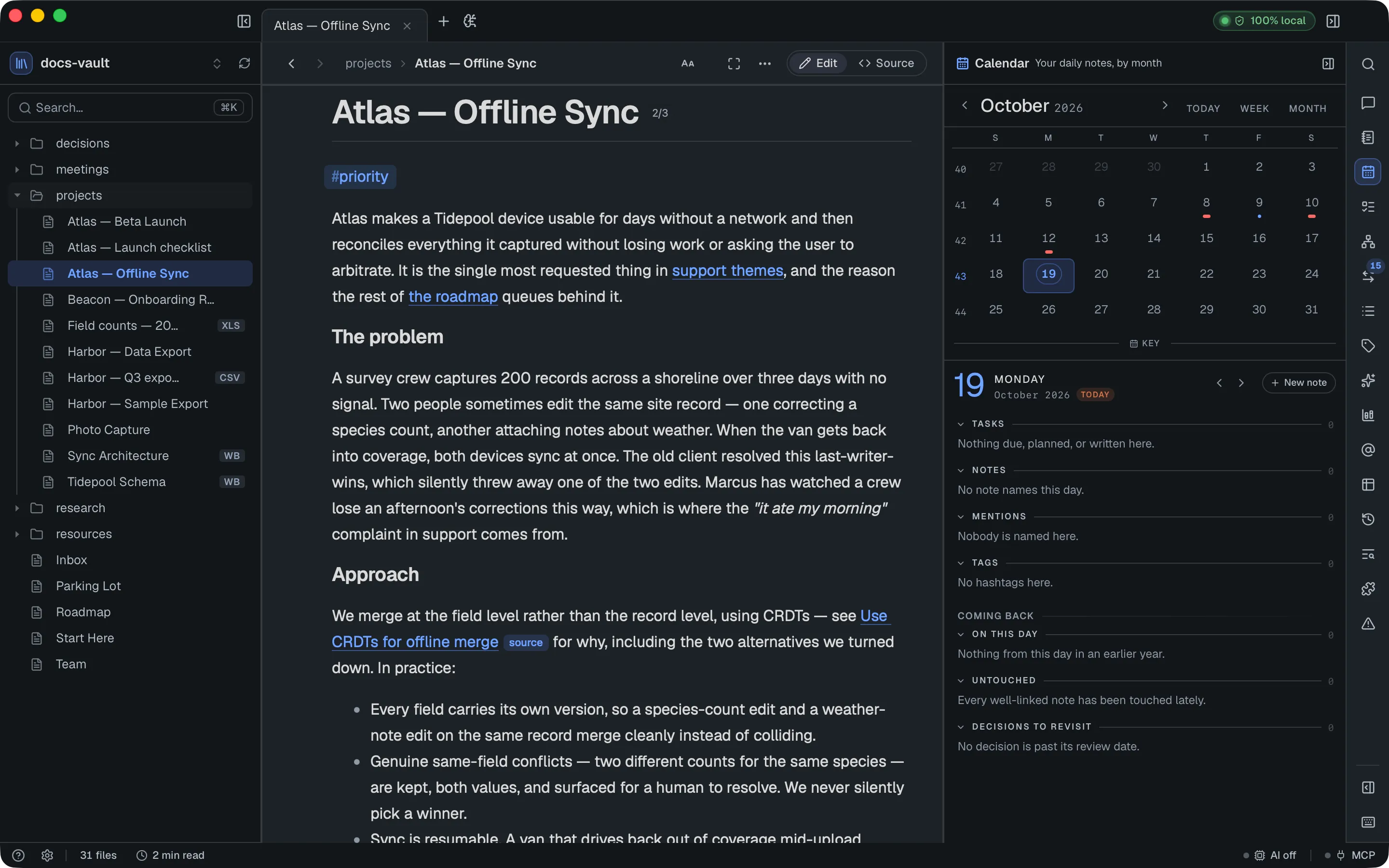
In the editing view
Section titled “In the editing view”| Control | Shown when | Covered in |
|---|---|---|
| ‹ › back / forward | Always — walks the links you followed (⌘[ / ⌘]) | Finding Your Way Around |
| Path (vault › folder › file) | Always — click a folder or the file to reveal it in the sidebar | Finding Your Way Around |
| Lock / Unlock | The file is encrypted | Encryption |
| Unlock n / Lock passages | The page contains encrypted passages | Encryption |
| Scripts on / off | The page contains <script> | Privacy & Security |
| Aa Display & reading | Outside Source | Reading & Presenting |
| ✦ AI menu — Summarize this file, Check spelling, Beautify this page (HTML only) | AI enabled | AI in Your Documents |
| Voice (mic icon) — Dictate here, Listen to page; with voice off, Turn on voice… | Always, except on boards | Voice |
Focus mode (⌘.) | Always | Reading & Presenting |
| ⋯ more actions | Outside Source — see below | |
Edit / <>Source (⌘E / ⌘⇧E) | Always (Source is disabled on read-only formats and on a locked encrypted file) | Above |
The ⋯ menu always holds the actions you reach for less often:
| Item | Covered in |
|---|---|
| Export to PDF | Reading & Presenting |
| Encrypt this file | Encryption |
| Collapse all sections / Expand all sections (with collapsible headings on) | Diagrams, Callouts & Code |
| Full width / Center content | Reading & Presenting |
Collapse all sections and Full width are also rows in Display & reading.
In <>Source
Section titled “In <>Source”Switching to the source editor adds the two tools that act on raw markup, and drops the ones that need a rendered page — no export, no reading controls, no Beautify.
| Control | Covered in |
|---|---|
Find / replace (⌘F) | Above |
Format document (⇧⌥F) | Above |
| • modified | Below — shown while there are unsaved edits |
When the window is narrow
Section titled “When the window is narrow”Buttons fold into the ⋯ menu rather than being dropped, by priority — Full width and the reading controls go first, Find and focus mode hold on longest. Everything in the menu keeps the state and behaviour it had in the bar. Back / forward, the Edit / Source pill, the security controls and the Voice button never collapse.
Autosave and undo
Section titled “Autosave and undo”Everything autosaves — after a short idle pause, and on demand with ⌘S (which simply flushes any pending edit). Autosave is silent: there is no “Saving…” or “Saved” indicator. The one state that ever shows in the title bar is a red Not saved, when the last change couldn’t be written. Source mode also marks unsaved edits with a • modified note in the toolbar. Undo (⌘Z) works across your editing session.
When a save fails
Section titled “When a save fails”If an inline edit can’t be saved — for example because the file changed on disk underneath you — DocGraph doesn’t discard what you typed. A toast appears at the bottom right, This edit wasn’t saved — your text is safe here, showing the reason and a preview of your text, with three buttons:
- Reapply tries the write again against the file as it is now.
- Copy text puts your text on the clipboard so you can paste it anywhere.
- Open source switches to
<>Sourceso you can merge it by hand.
The toast dims after a while but stays until you dismiss it with ×.
Saving in <>Source
Section titled “Saving in <>Source”In <>Source your edits stay in the editor until you press ⌘S. If the file changed on disk since you opened it there, ⌘S first asks: <name> has been modified outside DocGraph.
- Cancel does nothing; your edits stay unsaved. Esc picks this.
- Reload from disk throws your edits away and loads the file as it is now.
- Overwrite writes your version over the one on disk.
Enter picks none of them, so you can’t overwrite by accident. If a save fails, a Save failed notice with the reason shows at the bottom right for a few seconds; your edits stay unsaved, so you can press ⌘S again.
Closing the window while <>Source edits are unsaved asks You have unsaved changes in N file(s) and lists them. Keep editing (the default; Enter and Esc pick it) leaves the window open; Discard closes it and the edits are lost. With Keep running in the menu bar on, closing only hides the window, so nothing is lost and nothing is asked.
Save as…
Section titled “Save as…”In <>Source, ⌘⇧S asks for a new vault-relative path and writes the current contents there as a new page, then opens it. The original file is left as it was on disk. An extension you type (.html, .md, .markdown, .json) is kept as typed; a bare name gets the same extension as the original file.
Reading preferences
Section titled “Reading preferences”Text size, line spacing, font, focus mode and PDF export are all covered in Reading & Presenting.