Chat & Scopes
Chat is a panel that answers questions using the notes in your vault. It searches, reads what it finds, and answers with citations you can click — so every claim leads back to a note you can check. With Agent Mode on it can also act: create notes, edit them, apply tags, build tables and whiteboards. Each change asks you first, unless you choose to approve them all for the session.
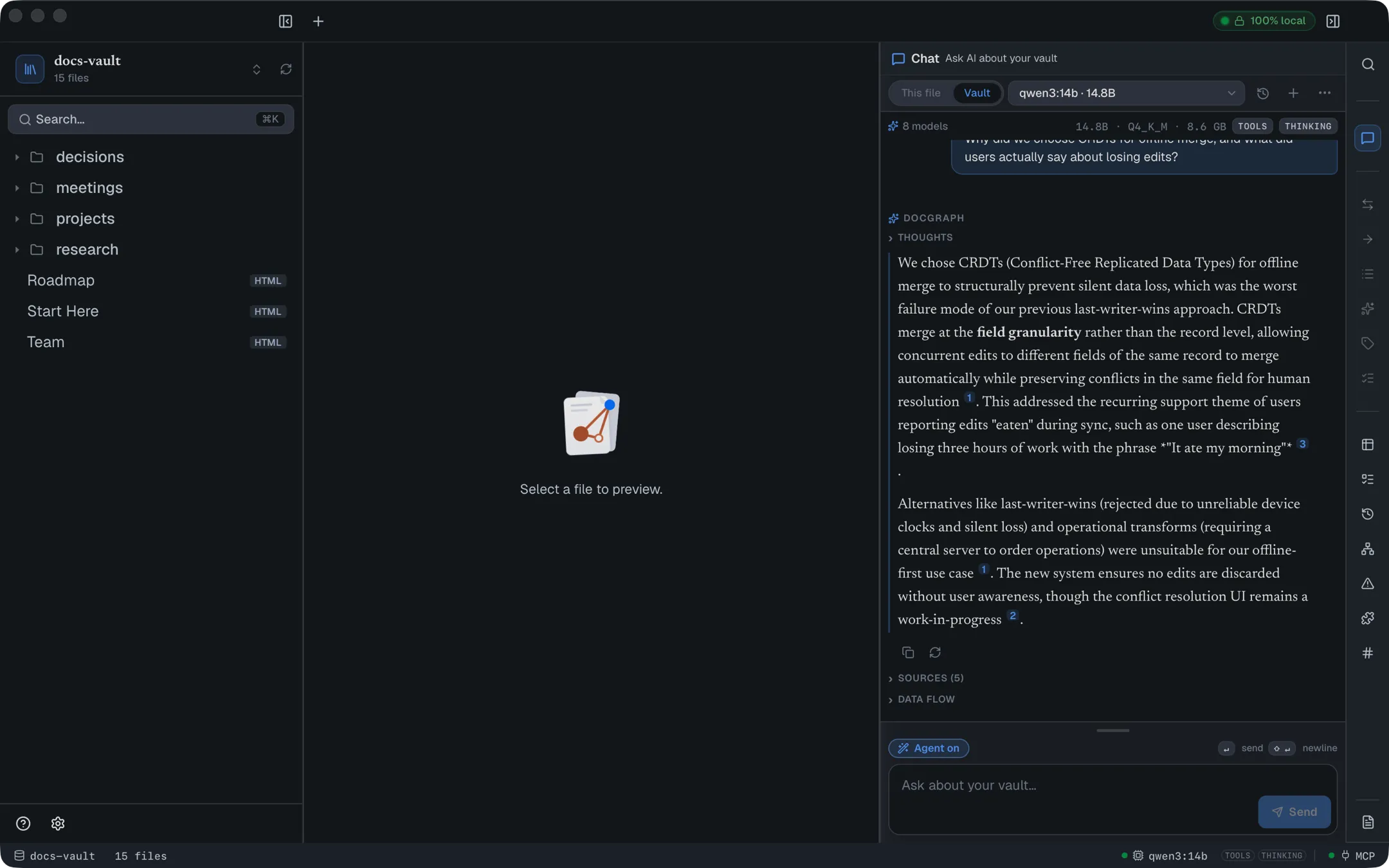
By default it all runs on a model on your own computer — the built-in runtime, Apple’s on-device model, or Ollama — and the badge in the corner reads 100% local because your notes and your questions stay on your machine. You can also pick a model from a cloud provider you have set up; the badge and a strip above the chat box then say where your messages go.
For things to try on the demo vault, grouped by what each needs from your model, see AI Chat Examples.
Getting there
Section titled “Getting there”Chat is the first tab of the right-hand panel, marked with a speech-bubble icon. If the panel is hidden, press ⌘⇧B to bring it back.
Before it can answer anything you need AI set up: a chat model chosen and AI enabled. Nothing else has to be installed — the setup wizard can download a model for DocGraph’s built-in runtime, use Apple’s on-device model, use Ollama or an AI agent you already have, or connect a provider. When AI is off entirely, the panel shows Private AI for your notes. with a Set up AI button, which opens that wizard, and the message box is hidden. Saved chats stay readable while AI is off. If you chose Ollama and it isn’t running, the panel says so and offers to set it up.
DocGraph also needs a search language — English only or Many languages. Until you choose one, the panel asks above the message box, which stays disabled, and nothing can be searched.
DocGraph also needs to have indexed your vault. Chat shows Indexing… n% in its status line while that runs; retrieval and every tool stay unavailable until it finishes, so a brand-new vault is briefly unable to answer.
Ask about your vault
Section titled “Ask about your vault”Type a question and press ↵. Use ⇧↵ for a newline, Esc to stop an answer, and ↑ in an empty box to bring back your last question.
The assistant searches your notes, reads the promising ones, and streams an answer as it goes. A Thinking… disclosure appears while it reasons (kept afterwards as Thoughts), and a Tools used disclosure records every step it took — which searches it ran, which files it opened. Each step shows how long it took; its details fold opens the exact arguments the tool was called with and the result it returned.
Answers are grounded in what it actually read. Where it doesn’t find support in your notes, it is built to say so rather than fill the gap.
A follow-up such as “and what about the API?” is rewritten into a stand-alone question before it is searched, so short follow-ups and pronouns work.
Find and open a note
Section titled “Find and open a note”“Find the note about my Berlin trip”, “open my notes on the pricing call”, “which note is about the soak window?” — DocGraph answers these itself, before the model is asked anything. A card lists up to eight matching notes, each with its date, folder, the passage that matched and why it was picked (contains berlin, trip, linked from Trips, similar in meaning).
- It opens the best one only when it is clearly ahead. Otherwise it lists and opens nothing. It never re-opens the page already on screen, and “find all…” or “list…” never opens.
- It understands time. “next”, “upcoming” or “planned” prefers notes dated after today; “last time” or “most recent” the nearest past one; “first time” the oldest. Dates come from daily-note names, task due dates,
@@dates, date properties and dates written in the text. - Follow up on the card: “open the second”, “#3”, “only 2025”, “only in Projects”, or “summarise these” to ask about exactly the listed notes.
- On the card: click opens, ⌘-click opens in a new tab, 1–8 open a row, ↑ ↓ move. Each row can copy a link to the note or add a link to it to the open page.
It works with Agent Mode on or off, and the card is saved with the chat.
How answers are laid out
Section titled “How answers are laid out”The assistant is asked to shape an answer for reading: a table when it compares things, a numbered list for steps, bullets for a set, and plain prose for a short answer. Callouts written the Obsidian way (> [!warning] Title) appear as the same callouts you use in your notes. Text in Arabic, Hebrew and other right-to-left scripts reads right to left, a block at a time.
- Tables — hover one for Copy table as Markdown and Copy table as CSV (ready to paste into a spreadsheet).
- Long code — past 25 lines a block folds; Show all n lines opens it, and its copy button always copies the whole block.
- Diagrams — a Mermaid diagram the assistant writes is drawn once it has finished writing it. If the diagram has a mistake, you see its source and a one-line reason instead.
- Charts — a small chart (bar, line, area, pie or scatter) is drawn the same way your notes draw charts. A chart the app can’t read shows its source and why.
Keep an answer in a note
Section titled “Keep an answer in a note”Under every answer, two buttons take it out of the chat:
- Insert answer into the open note adds the answer at the end of the note you are reading. In an HTML page it arrives as real blocks — a list is a list, a table is an editable table, a checklist item is a task, a callout a callout, a diagram a diagram — never as Markdown text. In a Markdown note it is added as Markdown. One ⌘Z takes it back out. Each table also has its own Insert table into note on hover.
- Save as a new note makes a new HTML page next to the note you have open (or at the top of your vault), titled from your question.
Citations become links to the notes they cite; any other link to a note in your vault is kept as plain text, so a model can’t add a link to a note that doesn’t exist. A chart arrives as a live chart: its numbers become a normal, editable table in your vault, and the note draws the chart from it. Each chart also has its own Insert chart into note on hover.
People, tags and dates are chips. When an answer mentions @sarah, #ops or a date like @@2026-10-09, and your vault knows that person or tag, it appears as a chip like the ones in your notes:
| Chip | Click | ⌘-click |
|---|---|---|
@name | The Mentions panel, opened on that name | Its page (or the Mentions panel if it doesn’t have one yet) |
#tag | The Tags panel, on that tag in All tags | — |
@@date | The Calendar, on that date | — |
A name or tag your vault doesn’t know stays plain text — the assistant can’t create a person by writing one.
When an answer stands on thin ice
Section titled “When an answer stands on thin ice”A small badge sits on top of an answer that deserves a second look: Not from your notes (searching failed, nothing was read), Unverified (none of its citations match what it read), Sources disagree (the notes it read contradict each other) or Check citations (some don’t match). Click it to open the answer’s Sources list; Dig deeper sits beside it.
Dig deeper
Section titled “Dig deeper”When an answer is thin, the telescope button (Dig deeper) under the latest answer asks the same question again with a wider search: more passages from your notes (up to 12 instead of 8), and two extra ways of finding related notes that are normally off because they cost time on every question. It takes a little longer. When an answer carries a caution badge, Dig deeper sits right next to it.
Keep a query answer as a live query
Section titled “Keep a query answer as a live query”When an answer came from a query over your vault — “which tasks are overdue for @sarah?” — a Keep this as a live query line appears under it. To this page saves the query and adds it, live, at the end of the open page; To the sidebar saves it and pins it as a panel. Next week it still shows next week’s answer. A live query can only live in an HTML page.
Narrow a question with tags, people, dates, note types or links
Section titled “Narrow a question with tags, people, dates, note types or links”A question can name what to search. “What did we decide about the cache, tagged #ops, last week?” searches only notes tagged #ops that mention a day last week or were edited then. DocGraph reads these filters from the question itself:
- Tags —
#ops, or “tagged ops”. - People —
@sarah. - Dates — today, yesterday, this week, last week, this month, last month, this year, last year, the last 10 days, or a date such as
2026-09-01(since, before, after and on work too). Weeks start on Monday, and “last week” means your own calendar’s last week, not a guess in another time zone. - Page properties — when the question names both the property and the value, for example “notes with status active”.
- Note types — “What decisions were made about the gateway?” searches only notes whose
typeisdecision(or a type that extends it). This works for the types declared in your vault ontology, and only when at least one note has that type. The line above the answer showstype: decision. - Links between notes — “What depends on the billing API?” follows your typed links (
depends on,supersedes,cites, and the other link types in your vault ontology) from the note named, up to two steps, and always includes the notes it reaches — even ones that share no words with the question. “What does the invoice service depend on?” follows them the other way. The line above the answer showsdepends-on ← billing-api. This only happens when the question names both a link type and a note title. - People, all spellings —
@nadyalso finds notes that write the same person another way (see One person, several spellings).
A line above the answer shows what the search was narrowed to, such as Searched only #ops Sep 21 – 27. If the filters leave too few notes to answer from, or a filter matches nothing at all (a tag nobody uses), DocGraph searches every note instead. The line then reads Filter not applied, with the filter struck through, so you know the answer did not come from the narrowed set.
The AI can also filter on its own when it searches during a turn; this line only describes the first search DocGraph makes before the AI starts.
Ask about the whole vault
Section titled “Ask about the whole vault”Some questions are about everything you have written rather than one fact: “What are the main themes of my vault?”, “What do I know about pricing?”, “Summarise my notes on incident response.” A few passages cannot answer those, so DocGraph answers them from its topics — the groups of closely linked notes shown in the graph’s topic mode.
With Topic summaries on (Settings → AI → Chat & index → Vault topics, on by default whenever AI is on), your local model writes a short summary of each topic in the background, a few topics at a time. A whole-vault question then reads the summaries that fit it best (up to eight), asks what each one contributes, and combines those into the answer. Under the answer, From n topics across your vault lists the topics it drew on; open one to read its summary and its notes, and click a note to open it.
- DocGraph decides from the question’s own wording whether it is about the whole vault. A factual question (“How long is the soak window?”) always gets the normal search, even if the model thinks otherwise.
- Until the summaries exist, the question is answered from matching notes as usual, and a line above the answer reads “Vault summaries are still building — answered from matching notes for now.” With Topic summaries off it says so instead.
- A topic’s summary is redone when notes join or leave the topic. Summaries are kept in the vault’s index only, never in your notes; turning Topic summaries off deletes them. They are always written by the local model, even when you chat with a cloud model.
- A question that also names a filter (
#ops, last week) or asks about selected notes is not treated as a whole-vault question.
When your notes disagree
Section titled “When your notes disagree”Two notes can state the same fact differently: an old policy says the soak window is 30 minutes, a newer one says 45. Turn on Find contradictions (Settings → AI → Chat & index → Contradictions; off by default, and it needs AI on) and your local model reads the checkable facts in your notes — durations, limits, amounts, owners, dates — a few notes at a time in the background, and again whenever a note changes. When two notes state one fact differently:
- On the note, a strip at the top says Another note says otherwise, with the fact, the value here, the value in the other note and that note’s date. Click the other note’s name to open it. Under each disagreement you can record what it is:
- This note is newer or The other is newer links the newer note to the older one as
supersedes. The disagreement stops being flagged. - Mark as contradicting links the two as
contradicts. They stay flagged, now marked Marked as contradicting, and the pair shows in the Problems panel.
- This note is newer or The other is newer links the newer note to the older one as
- In chat, when an answer draws on a passage that states a disputed fact, the AI is told what the other note says, so it gives both values instead of silently picking one. Under that source in Sources, a line reads another note says 45 min (2026-08-02); another note opens it.
- In queries, each disagreement is a
contradictionrow in thevault_healthsource, and the Contradictions source lists them with both values, both notes and the sentence each note states it in.
A note that links to the other with rel="supersedes" or rel="source" (or the reverse, superseded-by / cited-by) is not flagged — it is an update or a citation, not a disagreement. A fact is only kept when the sentence it comes from is in the note and states the value, and only about something your vault already names: a person, a tag, a note title, or a phrase several note titles share. A note’s own status or version (“superseded”, “v2”) is not a fact about the world, so it is never compared.
The facts are kept in the vault’s index only, never in your notes, and are always read by the local model, even when you chat with a cloud model. Turning Find contradictions off, turning AI off, or rebuilding the index deletes them. Each note is read at most once per change, and only its first ~1,200 tokens; a model that answers nothing for a note records none rather than trying forever. Small reasoning models that cannot answer without long thinking (such as qwen3:4b) find nothing; qwen3.5:4b-mlx is the tested model.
When nothing matches
Section titled “When nothing matches”With the English only search language, DocGraph can tell when nothing in your vault is about the question, such as asking a vault of project notes for the boiling point of mercury. The AI then gets no notes at all, and a line under the answer reads “Nothing in your notes matched this question closely — this answer comes from the model alone.” Treat such an answer as general knowledge, not as something your notes say. In This file scope the open file is always kept, whatever the question.
It catches questions your notes have nothing near. It does not catch a question about something your notes do cover but never answer — “What is Project Hydra’s price?” in a vault full of Hydra notes still gets those notes, and the AI has to say it can’t find a price.
Follow the citations
Section titled “Follow the citations”Small numbered markers sit inline in the answer. Click one and DocGraph opens that note. Below the answer, Sources (n) lists every cited file in the same numbering, so you can see the whole evidence trail at a glance.
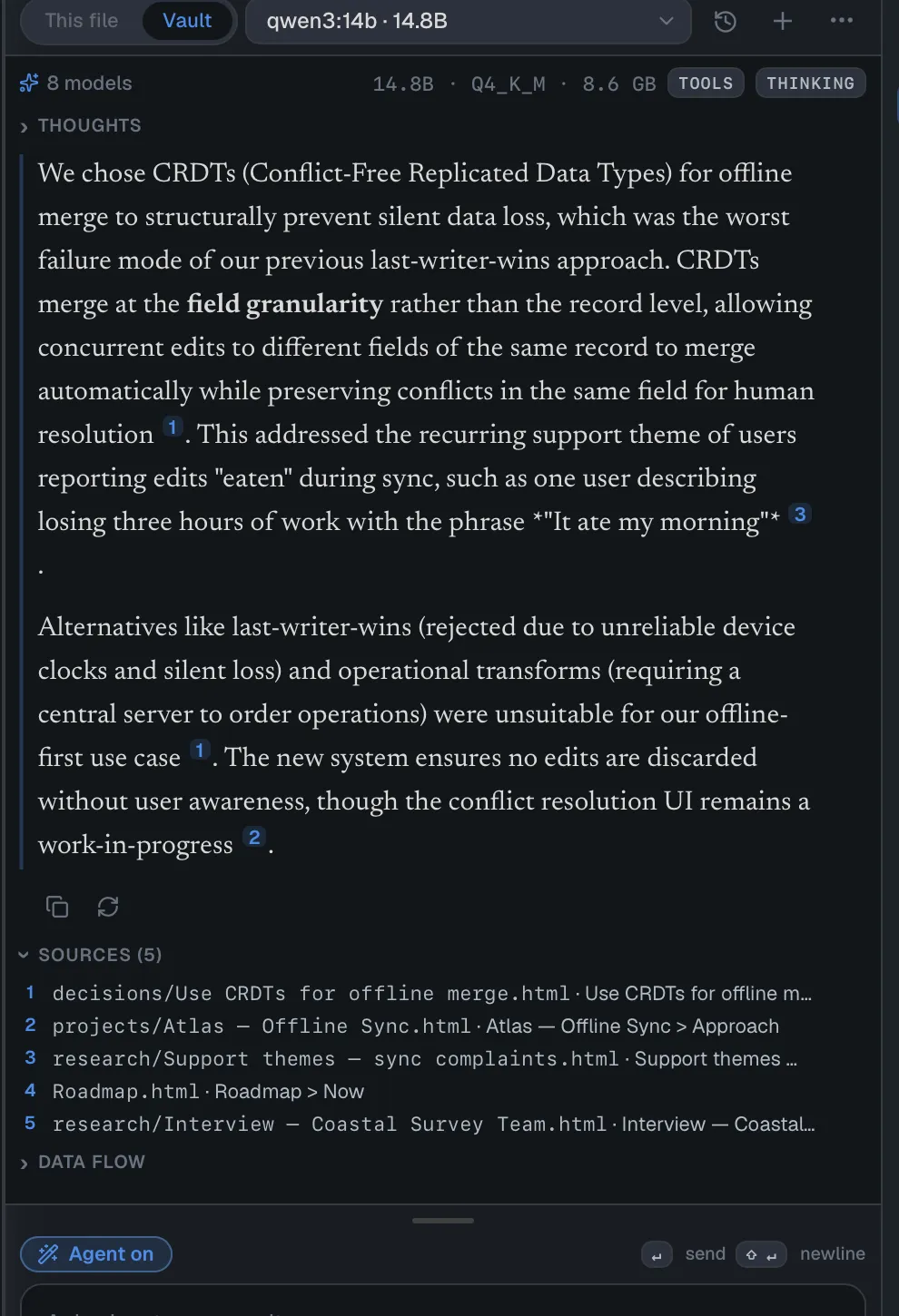
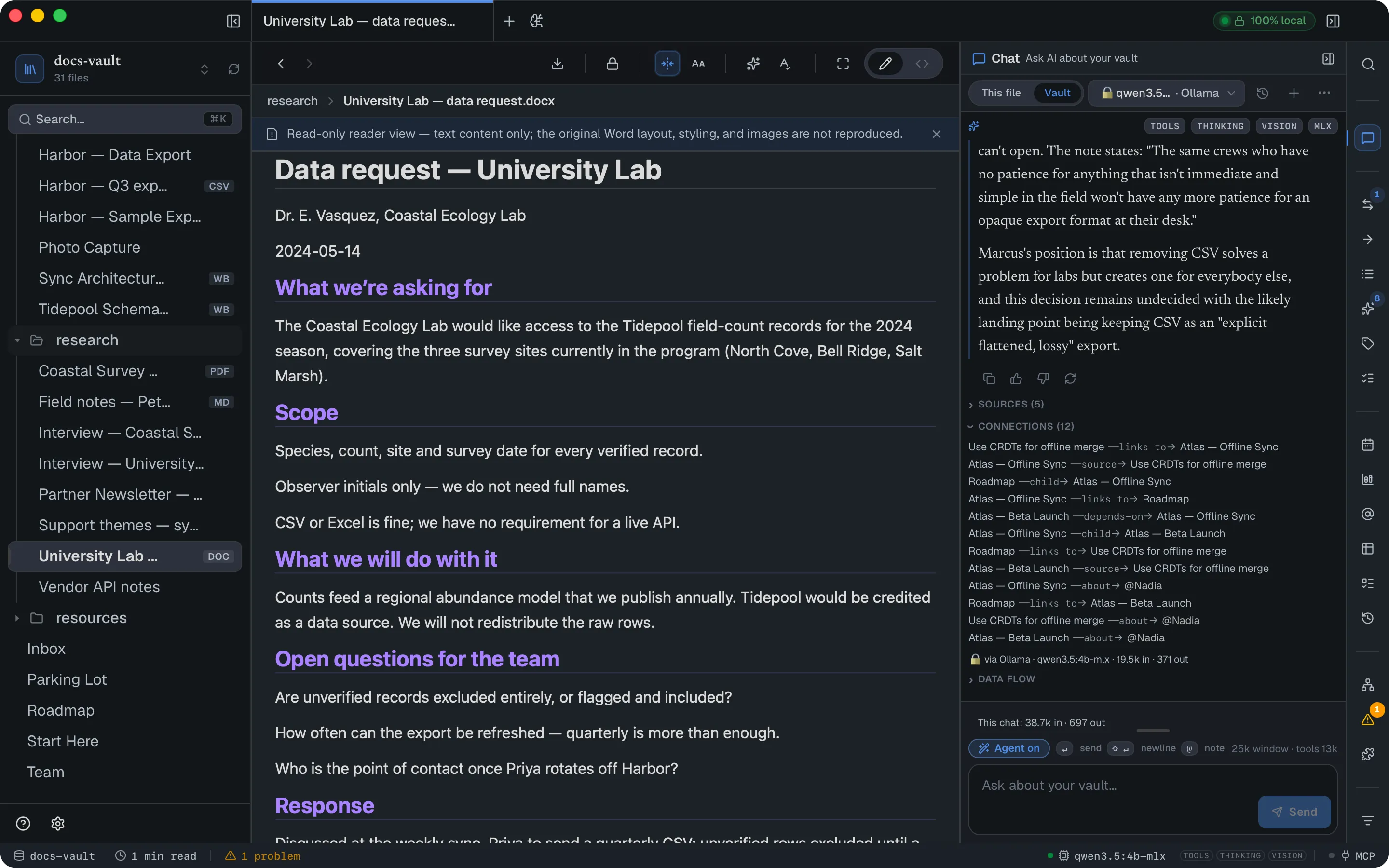
When the notes an answer used link to each other, Connections (n) appears under Sources: each line is one link, for example invoice-service ─depends-on→ billing-api, and a note name opens that note. The assistant is given the same list, so it can answer a question whose answer is a link (“does the dunning worker depend on the billing API?”) even when no note says so in words. Only links between notes the answer used are shown, at most twelve. The search_vault tool, used by the assistant and by MCP clients such as Claude Code, returns the same list with its results.
If the assistant cites a path that wasn’t among the notes it actually read, DocGraph doesn’t quietly hide it — the marker renders as a dimmed ? with a tooltip telling you to check the Sources list for what was really read. A banner appears if none of an answer’s citations could be verified.
Summaries and earlier answers are searched too
Section titled “Summaries and earlier answers are searched too”When you have summarized a note, the summary is searched alongside the note, so a long note can be found by what it is about even when its own wording never matches your question. The summary counts only while the note is unchanged; edit the note and its summary stops being searched until you summarize it again.
Answers that cited your notes are also kept as search material for later questions, weighted below your notes, so a note’s own text always beats a restatement of it. When a later answer used one, the Sources list shows from a previous answer (date) instead of a file; click it to open that conversation. Your own questions are never stored this way, and deleting a conversation removes its answers from search too.
See where an answer ran
Section titled “See where an answer ran”A usage line under each answer names the model (via provider · model for a cloud model), the tokens in and out, and the cost for a cloud model (≈ when estimated). Hover it to see where the answer ran. In Agent Mode, Tools used (n) lists every step; on a cloud model, a step that read a file says → sent to provider.
Ask how DocGraph works
Section titled “Ask how DocGraph works”The assistant also answers questions about DocGraph itself — “How do I export a note to PDF?”, “What does the privacy badge mean?”, “Can DocGraph open Excel files?”
- The answer comes from this documentation. A copy of these pages is built into the app, so the answer matches the version you have installed and needs no internet connection. With a local model nothing leaves your computer; with a cloud provider, the question and the matching sections go to that provider, as with any other question.
- It shows where it read it. The section it used is cited like a note, and appears under Sources with a DOCS badge. Clicking it opens that page of the documentation in your browser.
- Links go only to real pages. A documentation link in an answer works only if it points to a section the assistant was given; anything else is shown as plain text, never as a link that might not exist.
- No web search for these. A question about DocGraph is not sent to web search, even when web search is on — the answer is already here.
- Not covered, it says so. If these pages don’t describe something, the assistant is built to say so rather than guess at a feature.
An external agent connected over MCP can ask the same questions through the docgraph_help tool.
Ask about the open file
Section titled “Ask about the open file”The segmented control at the top of the panel switches between This file and Vault.
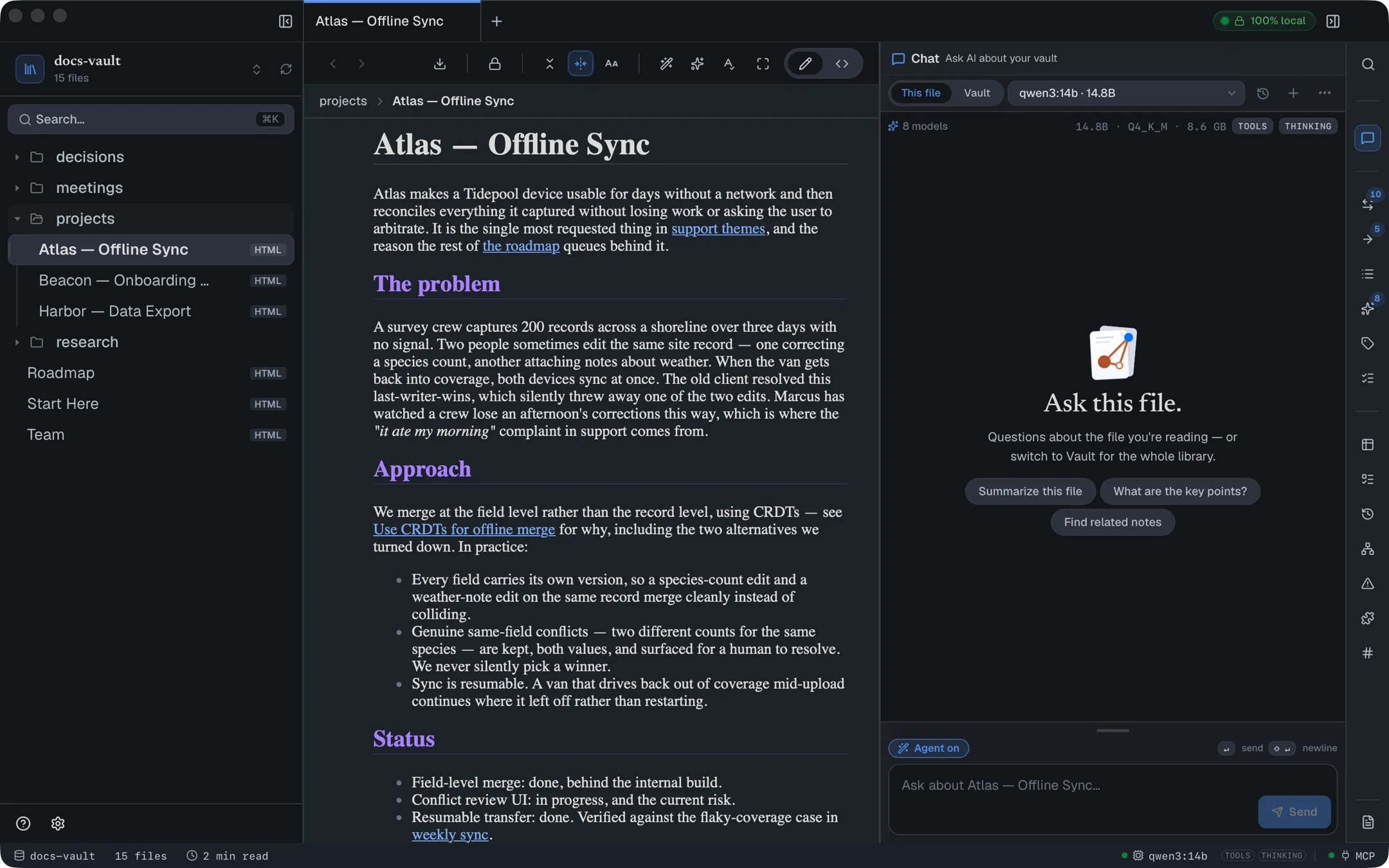
This file focuses the assistant on the document you’re reading: it’s told which file is open, that file’s content is weighted heavily in retrieval, and it can read the whole thing. It is a focus, not a fence — the assistant can still reach related notes when they’re relevant, which is usually what you want. Ask “what’s the biggest risk here?” and it will happily bring in the meeting note where someone said so.
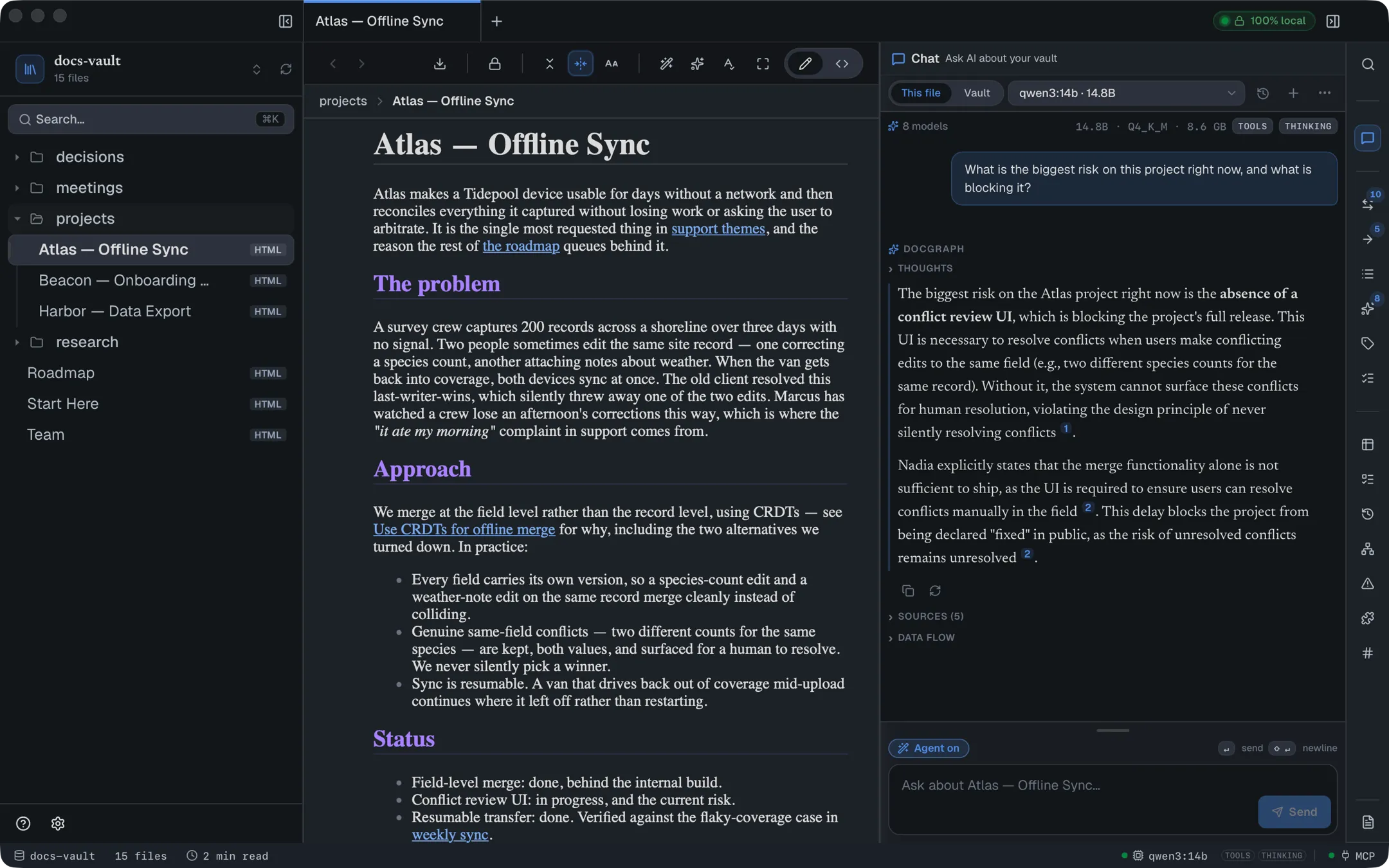
Vault searches everything that has been indexed, with no particular file favoured.
More ways to point the assistant at something specific:
- Right-click a file in the tree and choose Ask AI about this.
- In the Timeline or the graph view, select notes and choose Ask AI about n notes; a topic in the graph has its own Ask chip.
- In the system-wide quick switcher (⌃⌥K), type
?and a question to open the chat and send it straight away.
Notes picked this way become Asking about: chips above the composer, and the answer is centred on them. Chips apply to your next message only, then clear; Regenerate and Dig deeper reuse them.
In an HTML page, /ask answers right in the page instead: a cited answer from your notes, inserted as a draft you can keep, regenerate or delete — see AI commands in the editor.
When the open file is a scan
Section titled “When the open file is a scan”A scanned PDF has no text until DocGraph reads it. While the open file is a scan whose text isn’t in search yet, a strip above the composer says <file> is a scan — chat can’t read its text yet. with Make Searchable (see Scanned documents). The strip stays while the text is read, then offers Ask again.
Ask about the file before then (“can you read this?”, “summarize it”) and the app answers by itself, without the model: it can’t read the file yet, and here is how to fix that. While the text is still being read, the answer says how far it has got (I’m still reading the text of <file> (N of M pages so far)); when the text is in search, the panel asks your question again by itself. Once a scan is searchable, questions about the open file are answered from that file’s text only, unless you ask for other notes too (“other notes”, “related”, “find”).
Ask about a passage
Section titled “Ask about a passage”Select some text in a note and right-click: Ask about this, Explain this, Rewrite this and Make tasks from this open the chat with the passage quoted in the message box — add your question (or just send) and the assistant reads it with the rest of your vault. A rewrite comes back as an edit card showing the old and new text; nothing changes until you approve it.
Brief me on my day; what changed this week
Section titled “Brief me on my day; what changed this week”Two commands in ⌘K gather the facts first and only then ask the assistant to put them into words:
- Brief me on my day collects your open tasks due today or overdue, notes that mention today — the ones with a time first, as appointments — the people in them and today’s 1:1s. It opens today’s daily note first, so Insert answer into the open note under the answer puts the briefing in it. On today’s daily note it is also the first chip when you open the chat.
- What changed this week collects the versions of your notes saved in the last seven days (version history must be on for the vault).
The message tells the assistant to use only those facts, and they are in the message for you to see before you send it. With nothing to report, it says so instead of filling the space.
When you open it on a page
Section titled “When you open it on a page”Opened with a note in front of you, the chat starts with a few chips about that note, worked out without asking the model: how many of its open tasks are due today or overdue, a note it disagrees with, the note it is most related to, and Turn this page into tasks. That last one asks the assistant to add one task per action item on the page, keeping the people and dates the page names — on a 1:1 note, a task with no owner is the other person’s. Each task still shows its card for you to approve or edit. A chip only puts its question in the box; you send it.
If a note’s saved versions show changes since you last opened it on this computer, the first chip is Changed since you last opened it (version history must be on).
On a note in your Capture folder, the first chip is Suggest a home for this note: up to three folders where its most related notes already live. Pick one and the note moves there, with links to it updated. Nothing moves unless you pick.
An empty chat also offers a few starter questions for the scope you’re in (Summarize this file, What are the main themes?, Find orphan notes…), plus three chips that just open a note: Continue: note (the last note you had open, at the place you left it), Random note, and On this day (n) when notes from earlier years mention today’s date.
Compose your message
Section titled “Compose your message”Two shortcuts add a note to the question without leaving the message box:
- Type
@and the start of a note’s name. A list of up to eight matching notes appears; use ↑ ↓ and ↵ (or ⇥) to pick one, Esc to close. The@nametext leaves the box and the note becomes an Asking about: chip. - Drag a note from the file tree onto the message box. It becomes a chip the same way.
Click the × on a chip to remove it, or clear to drop them all.
Type / at the start of the box for the slash commands.
Drag the grip at the top of the message box to make it taller or shorter; double-click the grip to reset its height.
Hover the model picker to see how much the model reads at once (its window, the tool list and the share for notes); older turns are summarized or dropped to fit. A usage line (This chat: n in · n out · cost) adds up the tokens, and the cost for a cloud model. While a cloud model is selected, a strip above the box reads Sent to provider · off this machine; it can’t be dismissed.
To speak instead of type: with voice turned on, a Dictate button sits in the composer’s toolbar, beside Agent. Click it, speak, then click Stop: the transcript is added to the end of what is already in the message box, and you read it before sending. Nothing is sent automatically. Transcription runs on your computer, in English only.
Let it take actions
Section titled “Let it take actions”The Agent on / Agent off button in the composer toolbar decides whether the assistant can do anything beyond answering.
With Agent Mode off, it is strictly read-only — the tools that write are not merely blocked, they aren’t offered to the model at all. To keep each question quick, a model is usually first given a short Ask menu of the common reading tools (search, read, outline, backlinks, tasks, tables, help); when it needs another read-only tool it can ask for the rest, which costs one step.
With Agent Mode on, it can create and edit notes (new notes are built as HTML pages; find-and-replace edits work on .md too), apply tags, rename and move files, organise folders, add and update tasks, build tables, charts and whiteboards, and set folder icons. Each of those asks first, inline in the conversation, on a card headed Allow the assistant to run tool? that shows the arguments — including the full text it wants to write (Show raw arguments has the exact call):
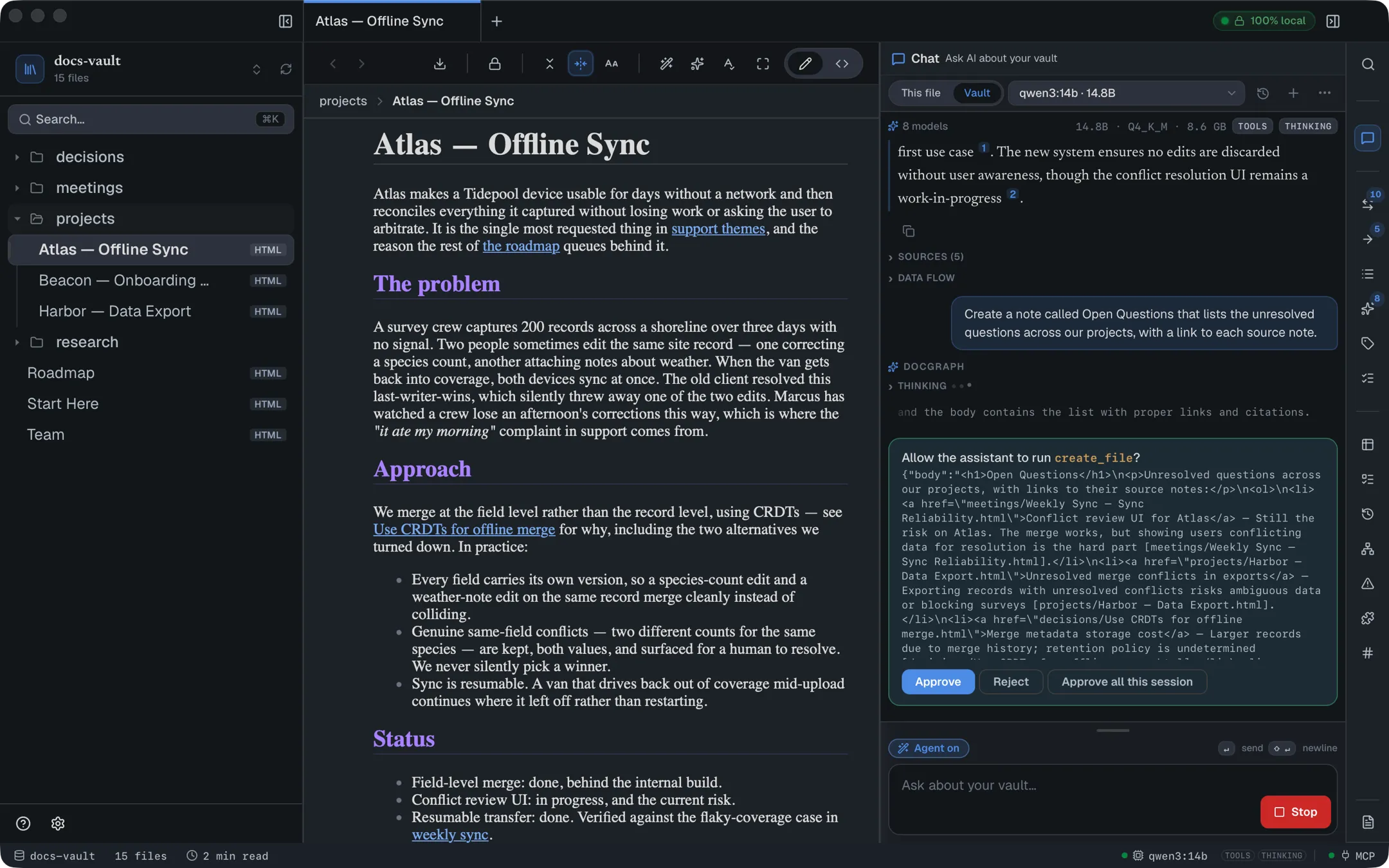
Approve or reject a change
Section titled “Approve or reject a change”Approve runs that one step. Reject declines it and lets the assistant continue without it. Approve all this session stops the prompting for writes — deletes included — until you close the app, start a new conversation (+) or open a saved one. While it’s active a banner (Auto-approving AI writes for this session) sits above the composer with a Turn off button, so you’re never unaware it’s on. A few cards never take part and always ask: memory, properties set on lines or todos, web searches, and a task whose date is still in your own words.
Add a todo in one sentence
Section titled “Add a todo in one sentence”Ask for a task the way you would say it — “remind me to call Adam tomorrow at 6pm”. The assistant adds it in one step, with Adam as the person (@adam) and tomorrow 18:00 as the due date, in your capture inbox unless you name another place (today’s daily note, the open page, or a note by name).
The date is read by DocGraph, on your clock, not worked out by the model. The confirmation card shows the task as it will land, and every part of it can be changed right there: the words, who it is for (remove a name, or add one from your People), the due date (type friday 9am and it is read again as you type), and where it goes (capture inbox, today’s daily note or the open page). Approve writes exactly what the card shows. If the date can’t be read, Approve stays off until you fix it.
A name your vault doesn’t know yet is marked new — approving it starts a new person. If it looks like a slip of one you already have (@sarha), the card offers @sarah? to switch with one click.
Suggested tasks. When an answer turns up something you might want to do — “Adam still owes the signed lease” — the assistant can offer it instead of doing it: a dashed + Add task: … chip under the answer. Click it to open the same editable card; nothing is added until you press Add.
Edits and renames show the change. An edit’s card shows the text it removes and the text it puts in; a rename shows from → to and notes that links are rewritten. The raw arguments are one click away.
Once it lands, the task appears under the answer as it was written — checkbox, chips and the note it went to, which opens on click — with Undo right below.
A task whose date is still in your own words always shows its card, even while Approve all this session is on — the card is where the date gets read.
Undo an AI change
Section titled “Undo an AI change”After a change lands, an ↩ Undo last AI change link appears beneath the newest answer. It reverts the most recent change (up to 25 back) for most writes — files, folders, icons, tree order, pins, tags, link types, tasks, captures, daily notes, templates, deleted properties, deleted tables and charts, whiteboards and memory. A few are not undoable this way: setting a page property, changing table rows or columns, saved queries, newly created charts and version-history snapshots.
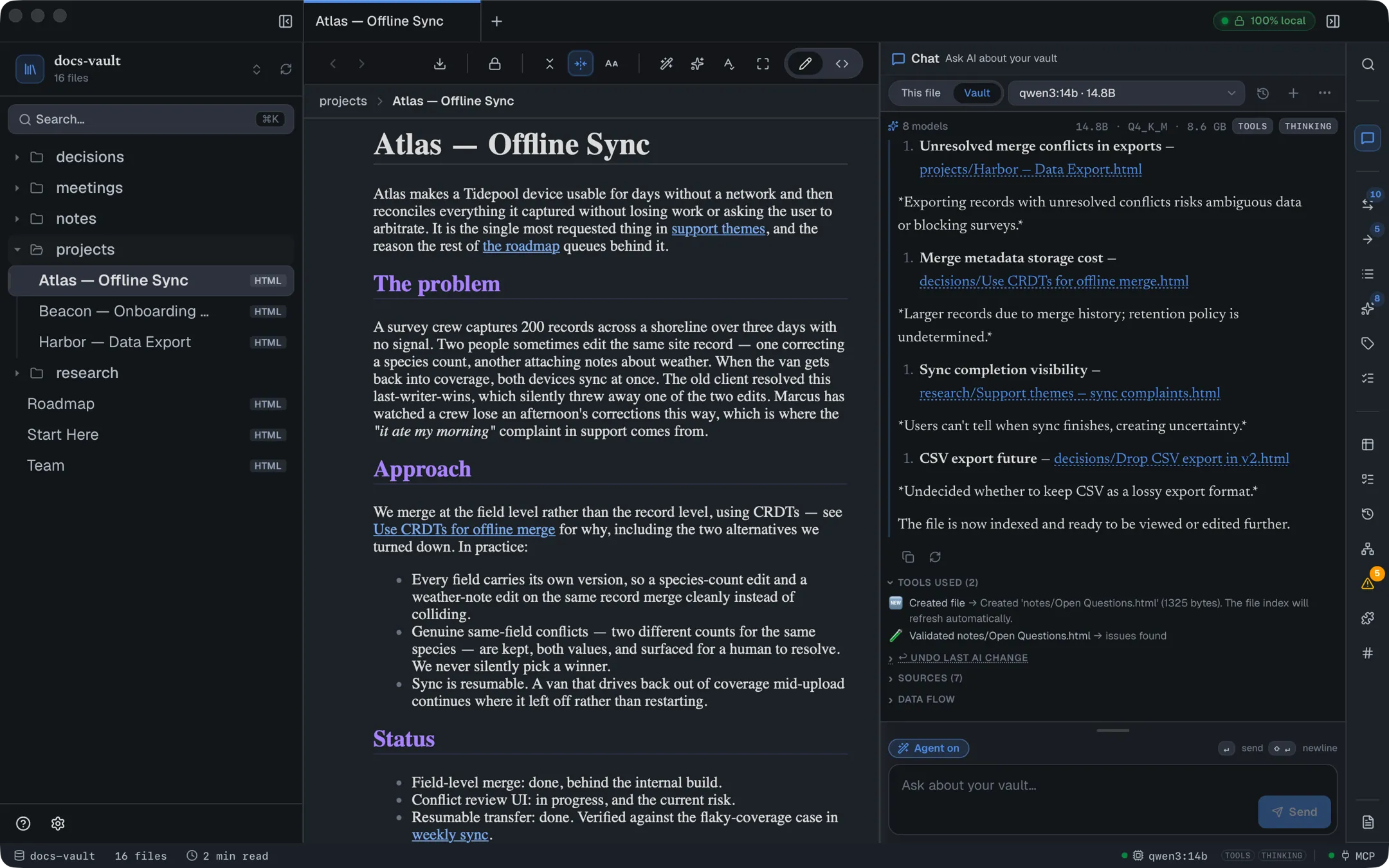
With Agent Mode on, the assistant can delete notes and folders — “delete every empty Untitled note” is a request it has to be able to finish. What stands between the request and the loss: the confirmation card lists every path (unless you chose Approve all this session), the files go to your OS trash rather than being erased, and deleted files get an undo entry. A deleted folder is undoable only up to 100 files and 2 MB; past that, the OS trash is the way back. With Agent Mode off, no delete tool is offered at all.
Turn Agent Mode off
Section titled “Turn Agent Mode off”Agent Mode starts on each session but isn’t remembered, so turning it off is a decision for that session, not a permanent setting.
Apple’s on-device model can’t use Agent Mode. Its window is about 4,000 tokens, too small for the tool list. While it is the selected model, the Agent button is greyed out and its tooltip says so; Apple’s model still answers questions about your notes. Pick a downloaded model, Ollama or a provider to let the AI act. See Apple’s on-device model.
What the assistant remembers
Section titled “What the assistant remembers”The assistant can keep a short memory across chats — a preference or a fact you told it (“I measure distances in kilometres”). It lives in one ordinary note, Memory/agent.md, and every chat reads it.
- It only proposes. With Agent Mode on, the assistant may suggest a line; a card asks Remember this across chats? with the line quoted. Nothing is written until you click Remember. This card is never skipped — not by Approve all this session, and not by an external agent’s auto-approve.
- You own the note. Open
Memory/agent.mdto edit or delete any line; the next chat reads what is there. - It stays small. About 500 tokens of the newest lines are read into a chat. When a new line would go over, the oldest move under an Older — not read into chat heading in the same note: kept, just no longer read.
- It is not a source. The memory note is never searched, cited or quoted into a draft; it reaches the assistant only as background, and anything written in it is treated as information, never as instructions.
External agents connected over MCP get the same two tools, read_memory and propose_memory, with the same confirmation in DocGraph.
Keep and revisit conversations
Section titled “Keep and revisit conversations”Conversations are saved automatically — your questions, the answers, stopped and failed turns, the thinking, sources and tool steps. A turn keeps running and saves itself if you close the panel; open the chat again and you rejoin it live. The history button opens Saved chats, where you can reopen, rename, pin or delete any of them; New (or + in the panel) starts a new one.
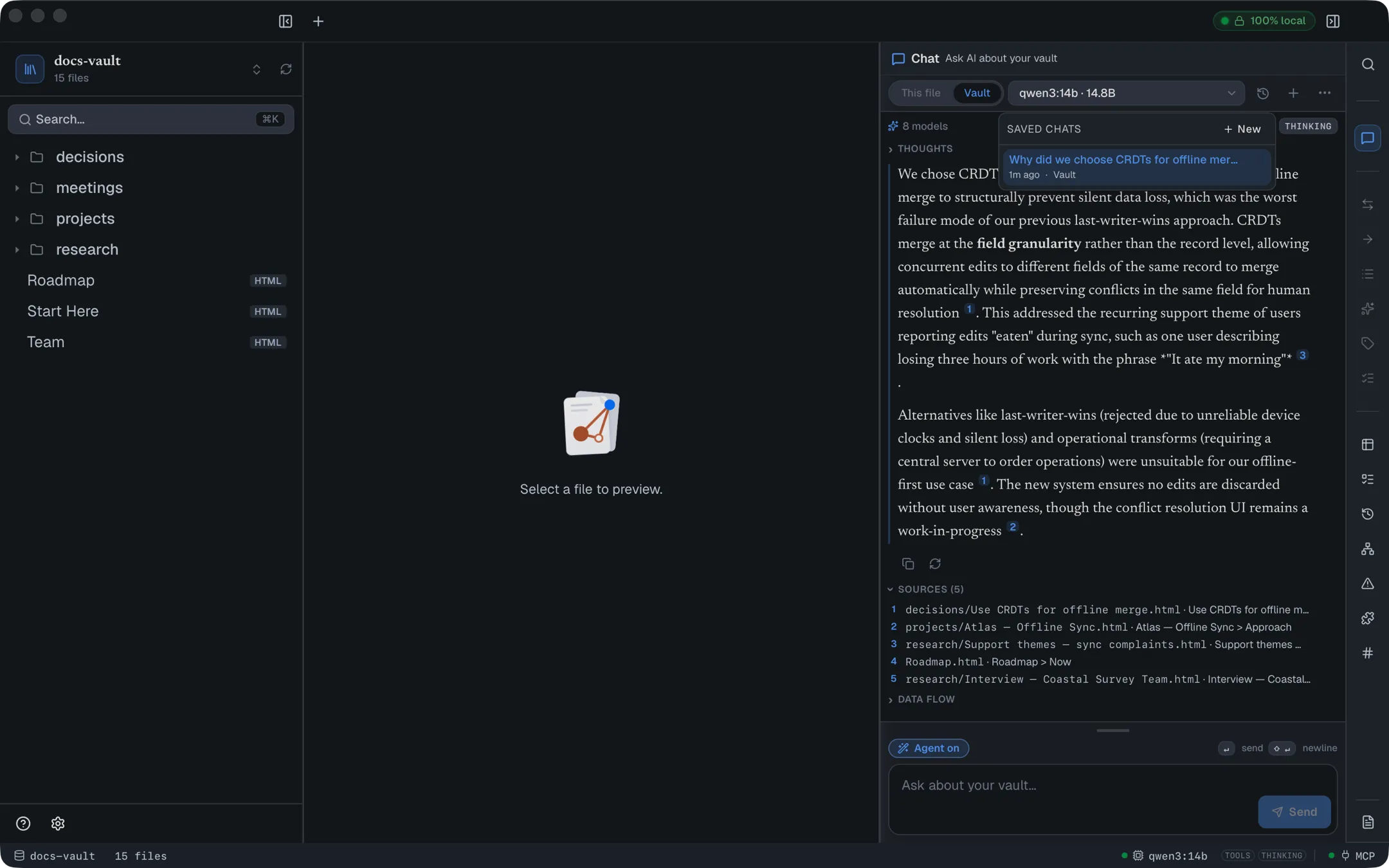
Each conversation remembers its own scope, and a reopened chat continues on the model that answered last. When a chat moves between a local and a cloud model (or to an external agent), a divider marks the switch, and before you send, it offers Start a fresh chat instead.
Find, rename, pin or delete a saved chat
Section titled “Find, rename, pin or delete a saved chat”In Saved chats:
- Search chats filters by title or by the file path the chat was about.
- This file appears beside the search box when a file is open, and narrows the list to chats about that file.
- Hover a row for Pin to top, Rename and Delete chat. Pinned chats show a pin mark. Rename edits the title in place (↵ saves, Esc cancels). Delete asks Delete? once, then shows a five-second Undo.
- A cloud mark on a row means that chat was sent to a cloud provider.
Copy, retry or edit a turn
Section titled “Copy, retry or edit a turn”- Hover an answer for Copy answer and, on the latest answer, Regenerate.
- When an answer fails, the error shows Retry, which runs the turn again with your question kept, and Copy error.
- Hover your own question to copy it, Edit & rerun it — which drops everything after it and asks again (⌘↵ saves, Esc cancels) — or Delete this turn (the question and its answer).
- The ⋯ menu has Copy as Markdown for the whole conversation, What the AI can do, Refresh connection, and AI settings.
Choose a model
Section titled “Choose a model”The picker in the panel header lists every model you can use, grouped by where it runs: local groups first (a laptop icon on the section heading) — the built-in runtime, Apple’s model and Ollama, whichever are set up — then any cloud provider you have allowed (a cloud icon on the heading, and a small cloud badge on each model’s icon). Each row shows the model family’s logo (Qwen, Gemma, Llama, Mistral, Claude, GPT and others; a plain chip icon when the family is unknown), then the model id with what is known about it — parameter size, context window and, for cloud models, an approximate price per million tokens. Picking a local model also makes it your default chat model; a cloud model or an external agent applies to the conversation, and each saved conversation keeps the model that answered it.
Under the panel’s masthead, chips show what the selected model can do (Tools, Reasoning, Vision) and where it runs (On this Mac or Off this computer). They appear once DocGraph has checked the model, and never for an external agent. A model without tools still shows the notice that it can’t take actions.
Type in the Search models box to filter. Plain words must all appear in the model’s id, name or provider. Two tokens narrow further, and you can combine them with words:
| Token | Shows |
|---|---|
@local, @cloud | Only models that run on this computer, or only off-machine ones. |
@ollama, @builtin, @apple, @openai, @anthropic, @openrouter, @custom, @agent | Only that provider’s models (@custom is a custom endpoint, @agent the external agents). Only one provider token applies — the last one typed wins. |
is:tools, is:vision, is:reasoning, is:free | Only models with that capability. Several is: tokens must all match. |
A token that doesn’t name anything known is treated as ordinary search text. The chips under the search box write these tokens for you — click Local, Cloud, a provider, or Tools, Vision, Reasoning, Free, and click again to clear. When a provider doesn’t report whether its models have a capability, the list ends with a note saying how many models were hidden for that reason, rather than treating them as lacking it.
Click the star on a row (Pin to the top) to pin a model. Pinned models sit in a Pinned section above the rest, and the models you last sent a message to appear in Recent while the search box is empty.
A model without native tools still answers from the notes DocGraph searches for it, but it cannot reliably act: the panel says it has no native tool calling, the Agent button shows a ⚠, and the tools are described to it in text instead — a less reliable fallback. Prefer a tools-capable model if you want the assistant to search further or make changes.
If you’ve enabled them in Settings → Connections → Agents & MCP, the picker also offers command-line agents — Claude Code, Codex CLI, Gemini CLI, OpenCode — under External agents. These are a different bargain: your question is handed to that agent in the vault folder, and it works with its own tools — none of DocGraph’s search, citations, history or tools, and with Agent on it runs in its own autonomous mode. It has full vault access, bills your own account with that provider, and is not covered by DocGraph’s per-change confirmations. DocGraph asks you to acknowledge that explicitly before enabling one.
An agent signs in with its own account. If it isn’t signed in, or its sign-in has expired, the answer shows a Sign-in required callout naming the command that fixes it (for Claude Code: run claude in a terminal, then /login), instead of the agent’s raw error. Sign in, then send your message again. An agent DocGraph can’t find on your computer is listed as Not installed in Settings → Connections → Agents & MCP, with a How to install link.
What runs in the background
Section titled “What runs in the background”Two AI jobs can run on their own while AI is on. Both use your local model, never a cloud one, and each has a switch in Settings → AI → Chat & index:
| Job | Default | What it does |
|---|---|---|
| Topic summaries (Vault topics) | On | Summarizes each group of linked notes so whole-vault questions can be answered. Turning it off deletes the summaries. |
| Find contradictions (Contradictions) | Off | Reads the checkable facts in your notes and flags notes that disagree. Turning it off deletes the facts. |
Topic summaries wait while a question is being answered.
Settings → AI → Chat & index → Your questions → Check re-checks answers graded before October 2026, when grading was removed. It re-asks those questions and reports how many still find their cited notes in the top 8.
Reference
Section titled “Reference”Scopes
Section titled “Scopes”| Scope | What it does |
|---|---|
| This file | Tells the assistant which document is open and weights that document heavily in retrieval; it can read the whole file. Related notes remain reachable. Unavailable when no file is open. |
| Vault | Searches everything indexed, with no file favoured. |
Slash commands in the composer
Section titled “Slash commands in the composer”Start a message with one of these and it runs as an action, with Agent Mode forced on for that message:
| Command | Effect |
|---|---|
/create … | Create a new note about what you describe. |
/edit … | Edit the note you’re looking at. |
/tag … | Suggest and apply tags. |
/rename … | Rename the open note. |
/tasks | Turn the open page into tasks, one per action item. |
/todo … is different: DocGraph reads it itself — /todo call adam tomorrow 6pm — and opens the task card straight away, with no model involved. It reads people and dates the same way the quick todo panel does.
AI commands in the editor
Section titled “AI commands in the editor”Typed in a document rather than in chat. These are entries in the / menu’s AI
group — type / then part of the name. They are HTML-only: the AI group does
not appear in the slash menu on a Markdown file.
| Menu entry | Effect |
|---|---|
| Write with AI | Generate a block from an instruction, inserted as a draft with Accept / Regenerate / Delete. |
| Ask AI | Ask a question; the answer comes from your notes, with the notes it used as links, and lands here as a draft you can keep, regenerate or delete. Ask in Chat instead opens the chat. |
| Beautify page | Reformat and restyle the page, with Keep / Revert. |
| Summarize | Insert an AI summary of the page as a TL;DR blockquote. |
| Continue writing | Draft the next one to three paragraphs. |
There are also three AI buttons in the document toolbar and an AI action on any text selection — see AI in Your Documents.
Keyboard
Section titled “Keyboard”| Keys | Action |
|---|---|
| ↵ or ⌘↵ | Send |
| ⇧↵ | Newline |
| Esc | Stop the answer being written |
| ↑ (empty box) | Bring back your last question |
| / (start of the box) | Slash commands |
| @ | Add a note to this question |
| ⌘⇧B | Show or hide the right-hand panel |
| ⌘⇧L | Open chat and put the cursor in the message box, from anywhere in the app — including inside a document |
Limits and troubleshooting
Section titled “Limits and troubleshooting”It says Ollama isn’t running. This only applies when Ollama is your chosen engine. Start it (ollama serve) and use Check connection in the panel, or open Set up AI… and pick the built-in runtime or Apple’s model instead. DocGraph only talks to Ollama on your own machine unless you deliberately turn on Allow remote Ollama in settings.
It has no models. Open Settings → AI → Models & providers and use Set up AI… or Download a model…. For Ollama, the panel also offers a one-click download of a recommended model, or run ollama pull <model> yourself.
It asks what language your notes are in. No search language is chosen yet. Pick English only or Many languages; the choice applies to every vault.
“This model’s context is small — answering with search only…” The model’s memory can’t hold every tool DocGraph offers in Agent Mode, so this answer uses fewer: without editing tools, or with just search and reading. Your notes are always kept in. For Agent Mode’s editing tools, choose a model with a larger context.
It can answer but can’t act. Your model doesn’t support tool calling. Switch to one with the tools pill. Small models that lack native tool support fall back to a less reliable prompt-based approach, and DocGraph warns you when that’s in play.
It stopped mid-task. Long agent turns hit a step limit and stop rather than running away — 6 model steps with Agent Mode off, 12 with it on, and at most 6 on a cloud model — and a turn ends after 10 minutes (time spent waiting for your approval doesn’t count; an approval card left unanswered for 10 minutes is declined). The answer says Stopped after the step limit and may be incomplete. Ask it to continue.
The answer looks confident but the citations are dimmed. Those are paths the assistant named without actually reading. Trust the Sources list, not the prose.
Answers vary between runs. Local models are not deterministic; the same question asked twice can be worded differently. The citations are what to check for consistency.
Why it is slow sometimes
Section titled “Why it is slow sometimes”While the assistant works, the answer bubble says what it is waiting for: Searching your vault…, then Reading 8 passages from your notes…, a step such as Searching “soak window”… when it uses a tool, or Loading the model (the first question after a break takes longer)…. On a local model three things decide how long a turn takes:
- The model itself. A bigger model writes each word more slowly, on every question. That is the model, not DocGraph.
- Loading. After the model has been idle for a while, the next question loads it into memory again first. Settings → AI → Chat & index → Keep the model in memory sets how long it stays loaded after your last question — from 5 minutes to While DocGraph is open. Longer means fewer waits; the cost is memory (several GB), not speed. DocGraph frees the model when you quit.
- Reading your notes. Every question sends the passages it found to the model, which reads them before answering. DocGraph keeps the instructions it sends before them warm in the model’s memory, so only the new passages are read.
“Nothing from Ollama after 15 s”
Section titled ““Nothing from Ollama after 15 s””If a question has produced nothing for 15 seconds and Ollama has not even loaded the model, the bubble says so and offers Restart model. That stops the question and unloads the models Ollama is holding, which frees an Ollama that has stopped starting new work. Then use Retry on the stopped answer to ask again. If Ollama does not answer at all, quit and reopen Ollama.
One thing the assistant deliberately will not do on its own: reach the internet. Your messages go only to the model you picked — on your computer, or to a cloud provider if you chose one. The one tool that goes online is web search, which is off by default. When enabled, each search is shown to you first on a Send this web search? card — Send search, Not now, or Allow in this chat to stop being asked for the rest of that conversation — and its results are treated as untrusted input. When web search is off and your notes don’t have the answer, the assistant may offer Enable & search instead; nothing is searched unless you click it.