Settings
Open Settings from the gear icon or with ⌘,. The left rail has five groups — General, Organize, AI, Connections and Privacy — plus Plugins, which for now holds a single Coming soon page. Most things work out of the box; this page is a reference for the rest.
Settings are saved to ~/.docgraph/settings.json. Layout density and interface size are the exception: they are kept by the app window itself, on this Mac.
Find a setting
Section titled “Find a setting”Type in Search settings at the top of the rail. Every word you type must match a setting’s label, its hint or its page; results list the setting and the page it is on. Click a result, or press Enter for the first, to open that page, scroll to the setting and flash it. Esc clears the search.
General
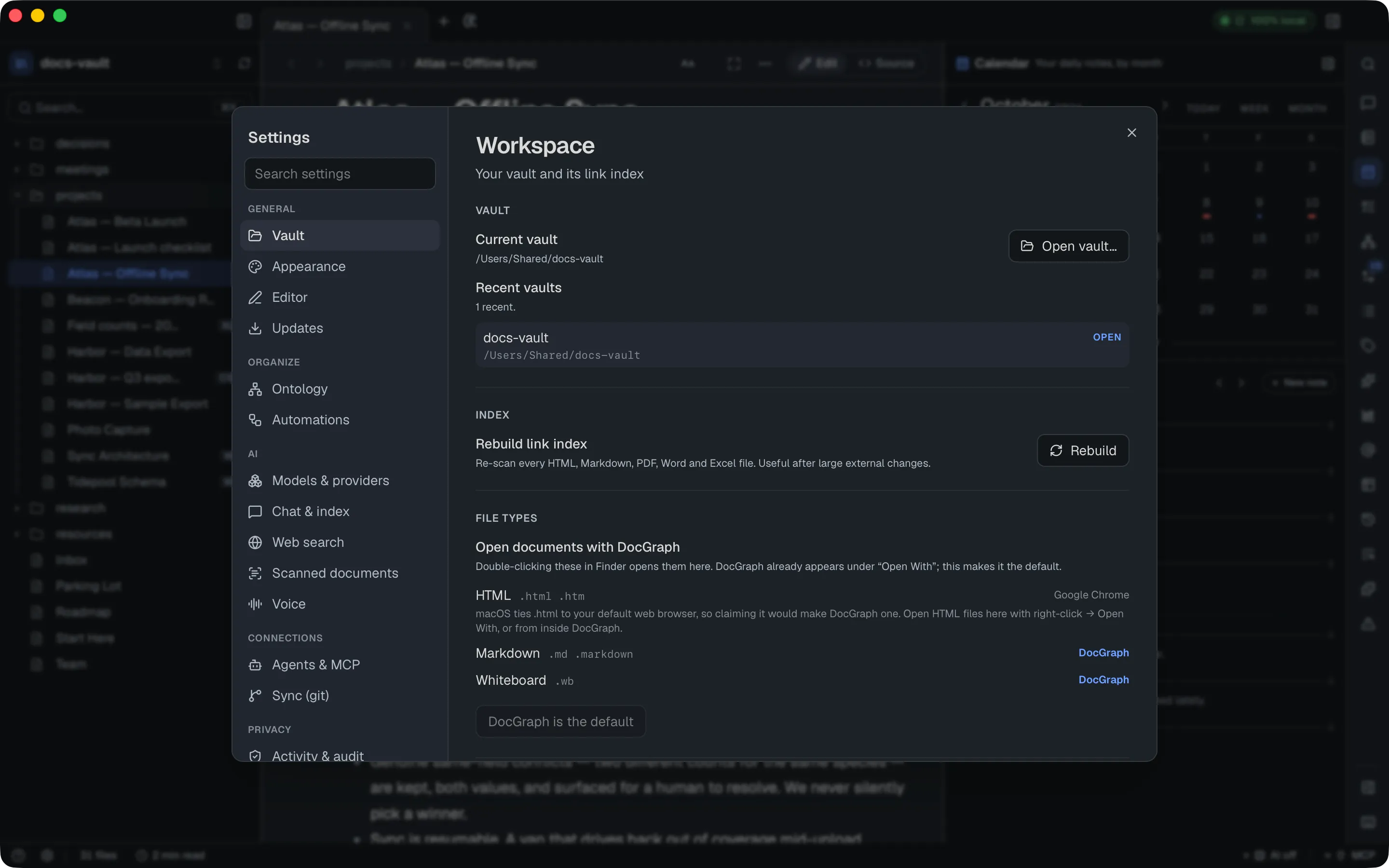
Section titled “General”The current vault’s path, an Open vault… button, your recent vaults (click one to switch), and Rebuild link index (re-scans every file DocGraph indexes — notes, Markdown, PDFs, spreadsheets and Word documents — useful after large external changes, like a bulk find-and-replace outside the app).
The Quick capture section holds Capture from anywhere (the system-wide ⌥Space capture box) with its Shortcut, Prefill from clipboard (on by default: the capture and todo boxes start with the text you copied, selected), the Capture note that ⌘⇧N writes to (Capture/Inbox.html by default), and the New note folder where a capture saved as its own note goes (Capture). See Quick Capture.
The same tab’s Templates & daily notes section sets three folders: where your templates live (Templates), where ⌘D puts today’s note (Daily), and where pages of @mentions and 1:1s are created (Mentions). A single dot means the vault root. It also holds:
- Stamp lines in new notes (off by default): when on, every new HTML note starts with Stamp new lines with the time switched on. Existing notes are never changed;
- the daily note’s template and its Filename pattern (see Daily note filenames);
- the Weekly note path (
Weekly/{{date:%G-W%V}}, where%Gis the ISO week’s year and%Vits week number) and Monthly note path (Monthly/{{date:%Y-%m}}), each with an optional template;{{daily:list}}in a weekly template becomes links to that week’s daily notes (see Weekly and monthly notes); - Template slot 1–3: each names a template and a destination — New note (in a folder you choose), End of today’s note, or End of the open note — with its own system-wide shortcut;
- the system-wide shortcuts other than quick capture’s: open today’s note (⌃⌥D), create a new note (⌃⌥N), add a todo (⌃⌥T) and find a note (⌃⌥K), which are on by default, and Clipboard to today’s note, This week’s note, This month’s note and the template slots, which are off with no key until you record one.
Each shortcut can be rebound or switched off here: click a Shortcut field and press the new combination (see Changing a system-wide shortcut).
Daily note filenames
Section titled “Daily note filenames”The Filename field shapes each daily note’s path inside the daily notes folder. {{date}} gives the standard date; {{date:%Y-%m-%d}} lets you write your own shape from %Y (year), %m (month), %d (day), %A (weekday name) and %B (month name). A / in the pattern makes subfolders, so {{date:%Y/%m}}/{{date}} files each note under its year and month. Only date tokens are allowed. The hint under the field previews today’s filename; see also Templates.
Open files from Finder with DocGraph
Section titled “Open files from Finder with DocGraph”The Vault tab also has a File types section: DocGraph is listed under Finder’s Open With for .html, .md and whiteboard (.wb) files, and Make DocGraph the default makes a double-click open them here. The button is never pressed for you. Each row shows what currently opens that type, and the button reads DocGraph is the default once it is done. HTML is listed but not offered: macOS ties .html to your default browser, so the row explains and you use Open With instead. See Opening files from Finder.
Appearance
Section titled “Appearance”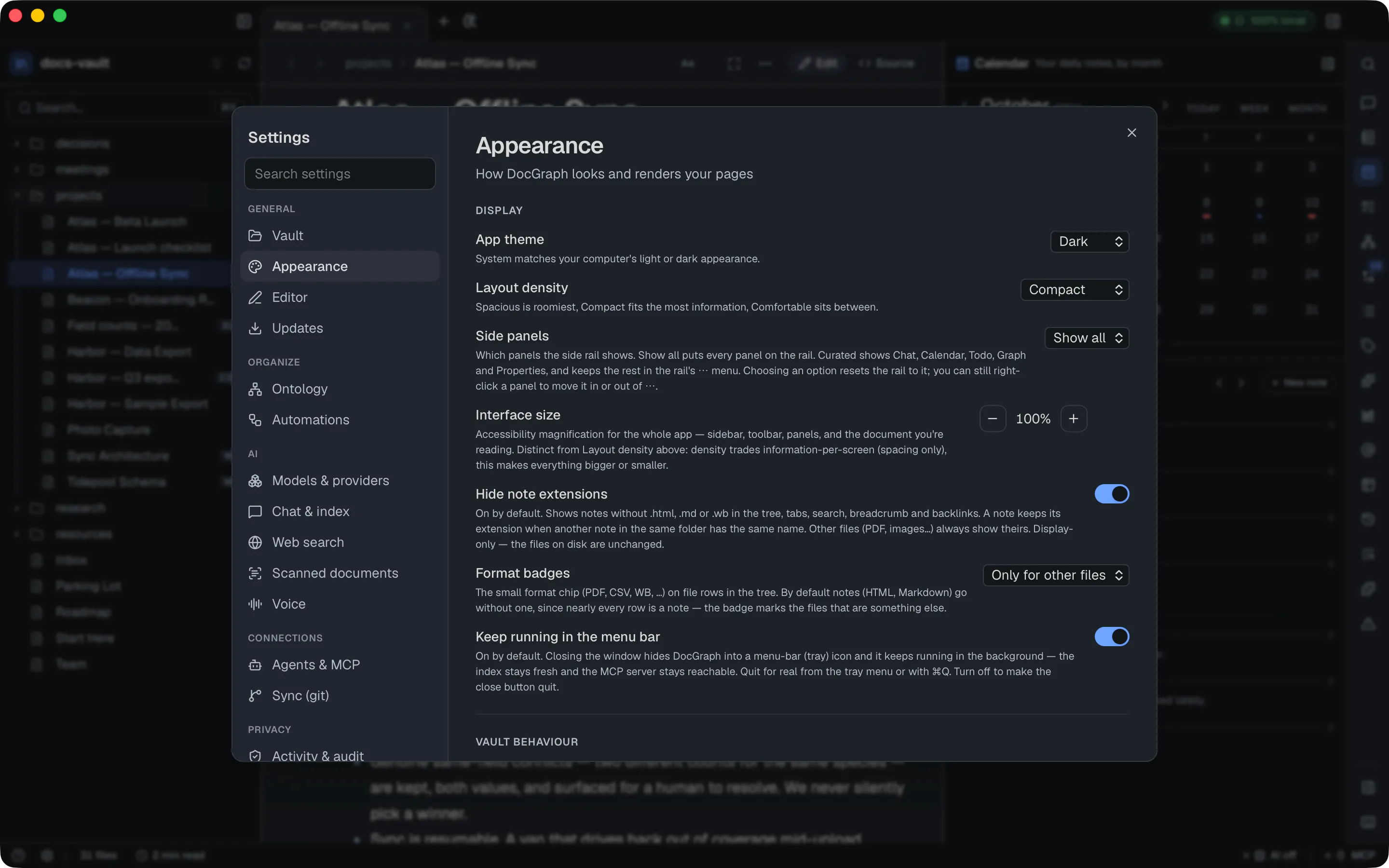
| Setting | Default | What it does |
|---|---|---|
| App theme | System | System, Light or Dark — see Change the theme |
| Layout density | Compact | Spacious / Comfortable / Compact |
| Interface size | 100% | 80% to 200%; magnifies the whole app — sidebar, toolbar, panels and the page — independent of density. Reset returns to 100% |
| Hide note extensions | On | Drops .html, .md and .wb from note names in the tree, tabs, palette, breadcrumb and panels. A note keeps its extension when another note in the same folder has the same name; other files always show theirs |
| Side panels | Show all | Show all puts every panel on the right-hand rail; Curated keeps Chat, This note, Calendar, Todo and Graph on the rail and the rest under ⋯. Choosing resets the rail to that layout |
| Format badges | Only for other files | A small format badge per file: Only for other files, On every file or Never |
| Keep running in the menu bar | On | See below |
Three more switches apply to the open vault only: Strip trailing whitespace on save (off), Collapsible headers (on: click a heading to fold its section) and Show “Referenced by” footer (on: the list of notes linking here, at the bottom of a page).
Keep running in the menu bar: closing the window hides DocGraph into a menu-bar icon instead of quitting, so the index stays fresh and the MCP server stays reachable; Quit DocGraph in the icon’s menu or ⌘Q quits for real. Turn it off and the close button quits. The change takes effect immediately, with no restart. The icon’s menu is described under Menu-bar icon.
The Increase / Decrease / Reset interface size commands in the command palette change the interface size from anywhere.
Change the theme (light or dark)
Section titled “Change the theme (light or dark)”DocGraph has two app themes, Light and Dark, plus System, the default, which follows your Mac’s light or dark appearance and switches the moment it changes.
- Settings → General → Appearance → App theme picks one directly.
- Toggle theme in the command palette (⌘K) switches between Light and Dark.
The choice is app-wide, the same in every vault, and is kept across restarts. The page you are reading follows the app theme; there is no separate reading theme. Your own HTML pages keep any styling they carry. Text size, line spacing and font for the page are set from the Aa (Display & reading) button in the toolbar; see Reading preferences.
Editor
Section titled “Editor”- Highlights — Highlight block on hover and Highlight block being edited, both off by default.
- Live Preview — Reveal syntax at the caret (on): shows the raw Markdown syntax of the text under the caret. Reopen the file after changing it.
- Typing — Auto-pair markdown syntax (on): typing
`,*,**,==or~~shows a faint closing mark. Type your text, then the closer, and it becomes code, italic, bold, highlight or strikethrough. Esc keeps the mark as plain text. Reopen the file after changing it. - Experimental — Single-host caret (Markdown) (on). Turning it off makes Markdown prose read-only in the inline view; edit via
<>Sourceinstead. Reopen the file after changing it.
Change how dates and times are shown
Section titled “Change how dates and times are shown”The Dates section of Editor sets how a date or time reads in your notes. The value is always stored in full (@@2026-08-29T09:00+02:00), so the file stays portable; this changes only how it is shown. Reopen a file after changing it.
| Menu | Choices |
|---|---|
| Date | Match my system (default), 29 Aug 2026, Short in your system’s order, 29/08/2026 (dd/mm/yyyy), 08/29/2026 (mm/dd/yyyy), 29.08.2026 (dd.mm.yyyy), 08.29.2026 (mm.dd.yyyy), 2026-08-29 (ISO) |
| Time | Match my system (default), 24-hour (17:30), 12-hour (5:30 PM) |
| Creation time in the margin | Time, with the date when the day changes (default), “2h ago” for today then the time, Date and time on every line, or Hide it — show on the handle instead. On pages that stamp new lines; the exact date and time are always on the block handle’s tooltip |
| Block properties after a line | Show each property as a chip (default), Show one “+N” chip, or Hide them (the properties window still lists them) |
Updates
Section titled “Updates”Shows your current version, a Check for updates button, and a Check for updates automatically switch that is on for a new install. With it off, a check only happens when you click. With it on, DocGraph checks a few minutes after you open it and about once a day while it stays open, at most once a day however often you open it; it fetches one small file and sends nothing about you; either way you are shown what changed and nothing installs until you choose it. Every downloaded update is cryptographically signed and verified before installing.
See what a check found
Section titled “See what a check found”The result appears right under Check for updates: You’re up to date with your version, or DocGraph X is available with its release notes and an Install and restart button that shows progress, then restarts. If nothing has been published yet, it says so in a neutral note. If a check or install fails, the error is shown, and after a failed install the button stays so you can try again. An update a check found is remembered: it is offered again at the next launch, with no network call, until you install it, skip it, or a later check finds nothing newer. × on the update bar hides it until the next launch.
What’s new in this version opens the release notes for the build you are running in a What’s new tab, offline. The same tab opens on its own once after a feature release, the first time you launch the new version (never on a fresh install, and not for bug-fix releases); Show release notes after an update turns that off. Help → Release Notes and the command palette’s Show Release Notes reopen it. The tab’s All releases link opens the full history in your browser, and its pictures come from docs.docgraph.app as described in Sync & Updates. The update bar that offers a new version, and the one-time opt-in for automatic checks, are covered in Sync & Updates.
Third-party notices, under the version, opens the licence notices of the components bundled inside DocGraph in your default viewer. Report a problem… and Request a feature… open the matching form on GitHub, with your version and system filled into a bug report; see Report a Bug or Request a Feature.
Organize
Section titled “Organize”Ontology
Section titled “Ontology”The vault’s vocabulary: note types and the keys each requires, typed property keys and what they point at, entity kinds, and the link relations the AI may write, plus anything the vault already uses that isn’t declared yet. It is stored in the vault as .docgraph/ontology.json; until you change something, the pane says the file is not created yet and shows the built-in defaults. Every edit is checked and saved straight away, and nothing here writes to a note. What each part means is explained in Note types and The vault ontology.
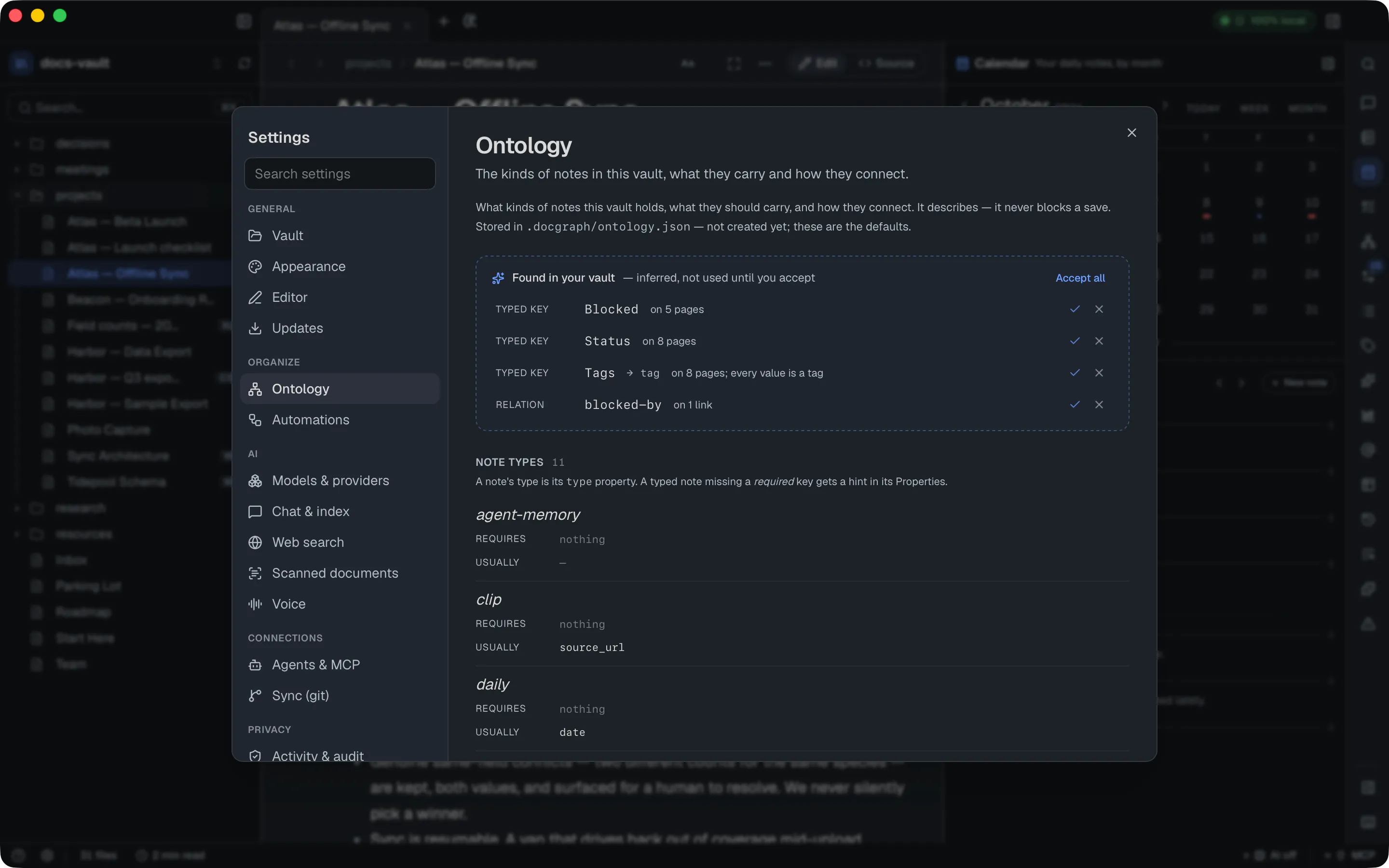
Until you change it, the vault starts with these note types: meeting, person, project, organisation, place, decision and daily, plus clip, email, transcript and agent-memory. A person, organisation or place note requires its own key (person:, organisation:, place:). The starting typed keys are person, owner and attendees, which point at a person, project, which points at a type: project note, and review-by, a date.
Accept what the vault already uses
Section titled “Accept what the vault already uses”Found in your vault, at the top, appears when the vault uses types, keys, kinds or relations nobody declared. Each row says why it was suggested. ✓ Declare it adds one, × Don’t suggest this again hides it for good, and Accept all takes the whole list. Nothing changes until you accept.
Add or edit a note type
Section titled “Add or edit a note type”Under Note types, type a name, optionally pick a type it extends (it then requires everything that type requires), and press Add type. For each type, Requires and Usually take comma-separated key lists, saved when you leave the field or press Enter; keys inherited from the parent type show faded. The trash icon removes the type.
Add a typed key
Section titled “Add a typed key”Under Typed keys, enter a key, pick its range — what the value points at: an entity kind such as person, or type:<a note type> — and press Add key. Each key also has a value type (any, text, number, date, bool or list). A key whose range is a person or a note type becomes a link in the graph. The trash icon (Forget) removes it.
Add or remove an entity kind
Section titled “Add or remove an entity kind”Entity kinds are what an @mention can be: person, project, tag, date, organisation and place to start with. Type a new one, such as client or vendor (lowercase letters, digits and -, starting with a letter), and press Add kind; it appears at once in the Mentions panel and can be a typed key’s range. The × on a kind removes it — person, tag and date can’t be removed. If names already use the kind, DocGraph lists them and offers Move them to another kind with Move and remove, or Keep it. Pages typed as the removed kind are left as they are.
Tune link relations
Section titled “Tune link relations”Link relations lists the rel values the AI may write on a link, each with its inverse and a weight from 0 to 10 — how strongly AI search follows it (the tick marks an ordinary link, 1.0). Type a name and press Add relation to add one; the trash icon removes it. Inferred edge weights sets the same weight for links DocGraph derives itself, such as a shared person, tag or date.
Restore the default ontology
Section titled “Restore the default ontology”Restore defaults deletes the vault’s ontology file, so the built-in defaults apply again. It is greyed out while no file exists.
Automations
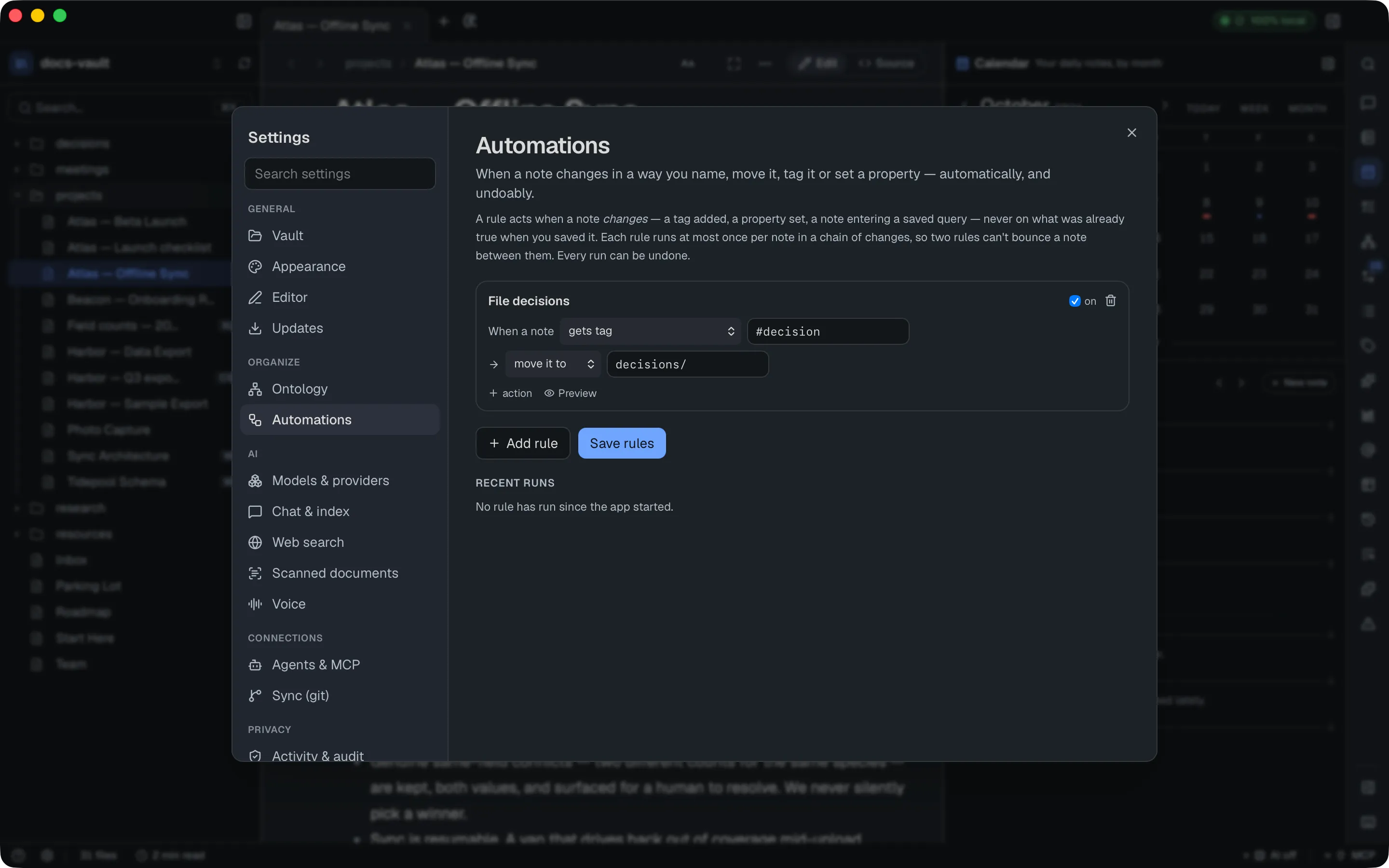
Section titled “Automations”Small rules that run on their own when a note changes, with no AI involved. Each rule reads as a sentence: When a note gets tag #archive → move it to Archive/.
Create a rule
Section titled “Create a rule”- Press Add rule. A rule named New rule appears: gets tag → move it to.
- Name it, then choose what it watches for — a note that gets tag, loses tag, has property set (to any value, or to one you type), becomes type, or starts matching saved query (a saved query).
- Choose what it does: move it to a folder (created if needed), set property, or add tag. + action adds another action; they run in order, and × removes one.
- Press Save rules. It is enabled only while there are unsaved changes, and a rule that can’t be saved shows why.
Rules live in the vault, in .docgraph/rules.json, so they travel with it.
Preview a rule
Section titled “Preview a rule”Preview on a rule card lists up to 12 notes that match it right now and what the rule would do to each, without doing it — or says No note matches right now.
When rules run
Section titled “When rules run”- A rule acts on changes only — saving a rule, or opening the vault, never touches notes that already carried the tag.
- Moving a note is a real move: links to it are rewritten, the same as dragging it in the tree. Moving a tagged note by hand does not count as tagging it again.
- Loop guard: in a chain of changes, a rule acts on a note at most once, so two rules can never bounce a note back and forth.
Undo a rule’s run
Section titled “Undo a rule’s run”Every run since the app started is listed under Recent runs — File archived notes: moved 3 notes, with the time — and Undo reverses the whole run. Undone runs are struck through, and the list starts empty after a restart. Each run also appears as a rule_run row in the vault_health query source.
Turn a rule off or delete it
Section titled “Turn a rule off or delete it”Each rule has an on checkbox beside its name. A rule that is off stays in the list, drawn faded, and does nothing until you tick it again. The trash icon deletes the rule. Press Save rules afterwards.
Models & providers
Section titled “Models & providers”Models — the local models AI chat can use. At the top is AI features, the master switch for every AI feature (off by default; choosing a model with Use also turns it on). Next comes Set up AI…, which compares every way to turn AI on and what fits this computer, followed by Apple’s on-device model (where the Mac supports it), Built-in AI (DocGraph’s own bundled runtime, with models you download or add from a file you already have, Unload to free memory, and Check for new models; a Hugging Face model or link is under Advanced in Set up AI…), and then Ollama, which is optional and only for people who already run it. Models download only when you choose one. See Local AI Setup for the paths and their limits, and Model downloads for where each file comes from.
AI Providers, further down the same page — hosted models (OpenAI, Anthropic, OpenRouter) or your own OpenAI-compatible endpoint, using your own API key. Keys are stored only in the macOS keychain. Each provider has a card with its status, an API key field, Test & refresh models, and Allow …, which you press before anything is sent to it; a custom endpoint also has an endpoint URL. A Block secrets from being sent to cloud providers switch is on by default. Nothing goes to a hosted provider until you allow it, and every request is logged to Activity. See Cloud AI providers.
Chat & index
Section titled “Chat & index”Chat — auto-surfaced TL;DR summaries (on by default) and inline completions while editing (off by default); a default chat model and a utility model for helper tasks (Same as chat model by default); the context window (8192 by default); how long to keep the model in memory (30 min by default, up to While DocGraph is open); temperature (0.7); a read-only Last answer line timing the most recent turn; and an explicit confirmation gate before DocGraph will talk to a remote Ollama host instead of your local one. Two more controls sit here:
- Summary cache with Clear summary cache deletes every cached TL;DR summary for this vault. They live in DocGraph’s index, not in your notes, which are untouched. Summarize a note again from its toolbar to recreate one.
- Ollama base URL (default
http://localhost:11434, saved when you leave the field) points at any Ollama-compatible endpoint. A non-local host is refused unless Allow remote Ollama is on, which asks you to confirm because note content would then leave your computer.
AI Index, below Chat — the search language (English only or Many languages, one choice for every vault — the AI can’t search your notes until it is set), a Rerank results switch for the second small model that reorders what search found (on by default), coverage of the local retrieval index (how many files are embedded) and a Re-sync now button. This is a distinct index from Vault’s link index — this one is what semantic search and chat retrieval read from. Two background jobs live here too: Vault topics (topic summaries for whole-vault questions, on by default with AI; turning it off deletes them) and Contradictions — Find contradictions, off by default, reads the facts in your notes with the local model and flags notes that state one fact differently (details); its status line shows how many notes are read and how many disagreements were found. Two more sections sit at the bottom:
- Your questions → Graded answers. Answers can no longer be graded (the 👍/👎 buttons are gone), but questions graded earlier stay in a small test set. Check re-asks them against today’s index and reports how many still find those notes in the top 8, listing the ones that no longer do. It runs entirely on your machine.
- What the AI can see. The notes the assistant can actually retrieve from: file, chunk and model counts, each indexed file with its chunk count, size and index time, a stale flag on files changed since they were indexed, and a list of files that are not indexed yet. Refresh re-reads it.
Web search
Section titled “Web search”Off by default, and there’s no DocGraph-hosted search or API key involved: you point it at your own SearXNG server, optionally restrict it to a server on this computer (Local server only), and test the connection before relying on it. If you don’t have a server, the pane can set one up for you in Docker. A Results section sets the language, SafeSearch, Published within and results per search (5 by default), and Recent searches lists this session’s queries. See Web Search.
Scanned documents
Section titled “Scanned documents”Reads the text out of scanned PDFs and images so search and the AI can find it, entirely on your Mac. It works with AI on or off. Here you choose whether scans are read at all, whether DocGraph asks per file or reads every scan automatically, Fast or Best quality, pausing on battery, and folders to skip. See Scanned documents.
Dictation and read-aloud. See the dedicated Voice page.
Connections
Section titled “Connections”Agents & MCP
Section titled “Agents & MCP”External agents — locally installed AI command-line tools (Claude Code, Codex, Gemini, etc.) that DocGraph detects on your machine and lets you pick as an alternative chat source. All are off by default; enabling one asks you to confirm:
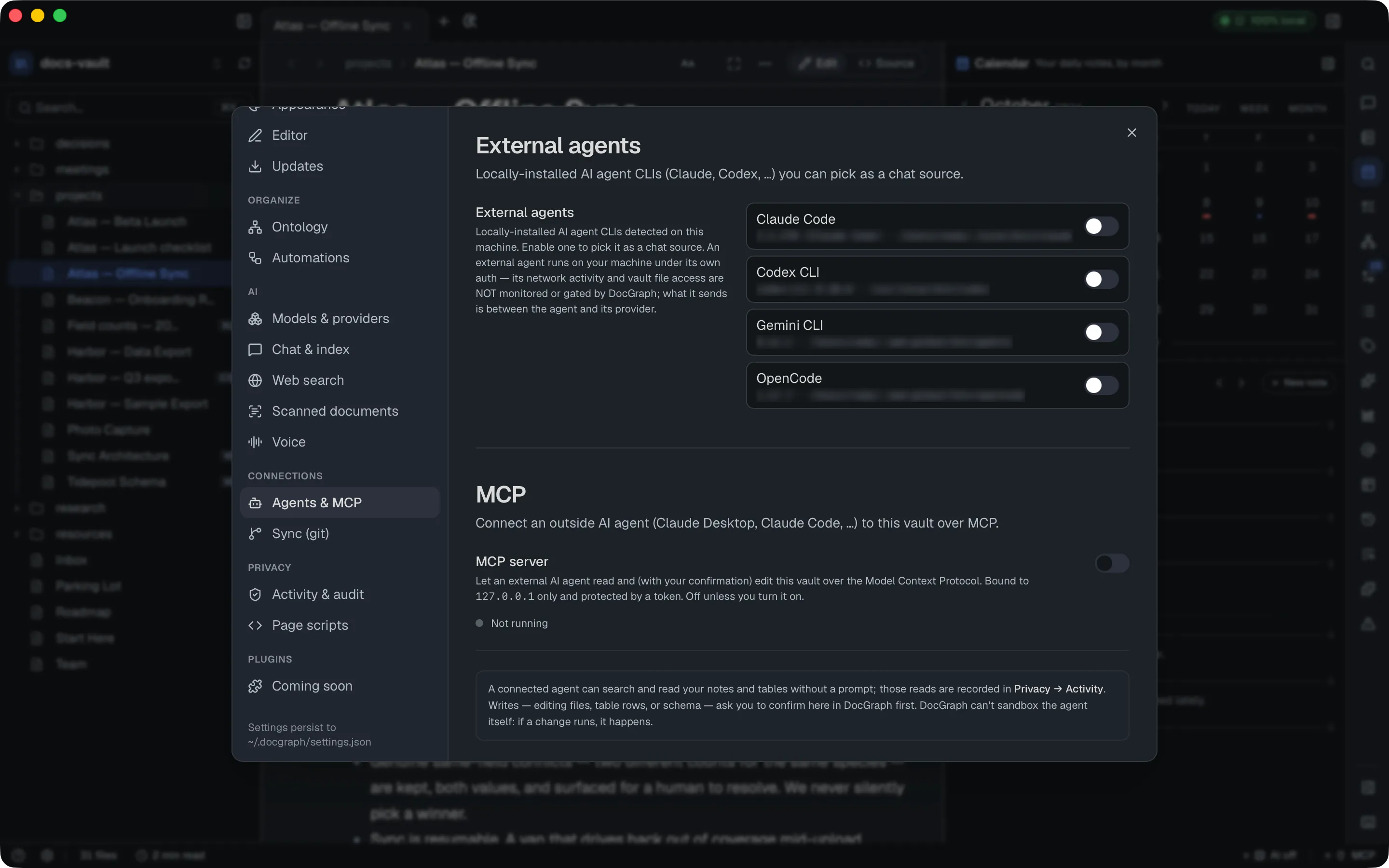
An external agent runs under its own authentication — its network activity and vault access are between it and its provider, not something DocGraph monitors or gates.
MCP, below — DocGraph’s inbound server, letting an external agent (Claude Code, Claude Desktop) connect to this vault over the Model Context Protocol. See Connect an External Agent for the full setup:
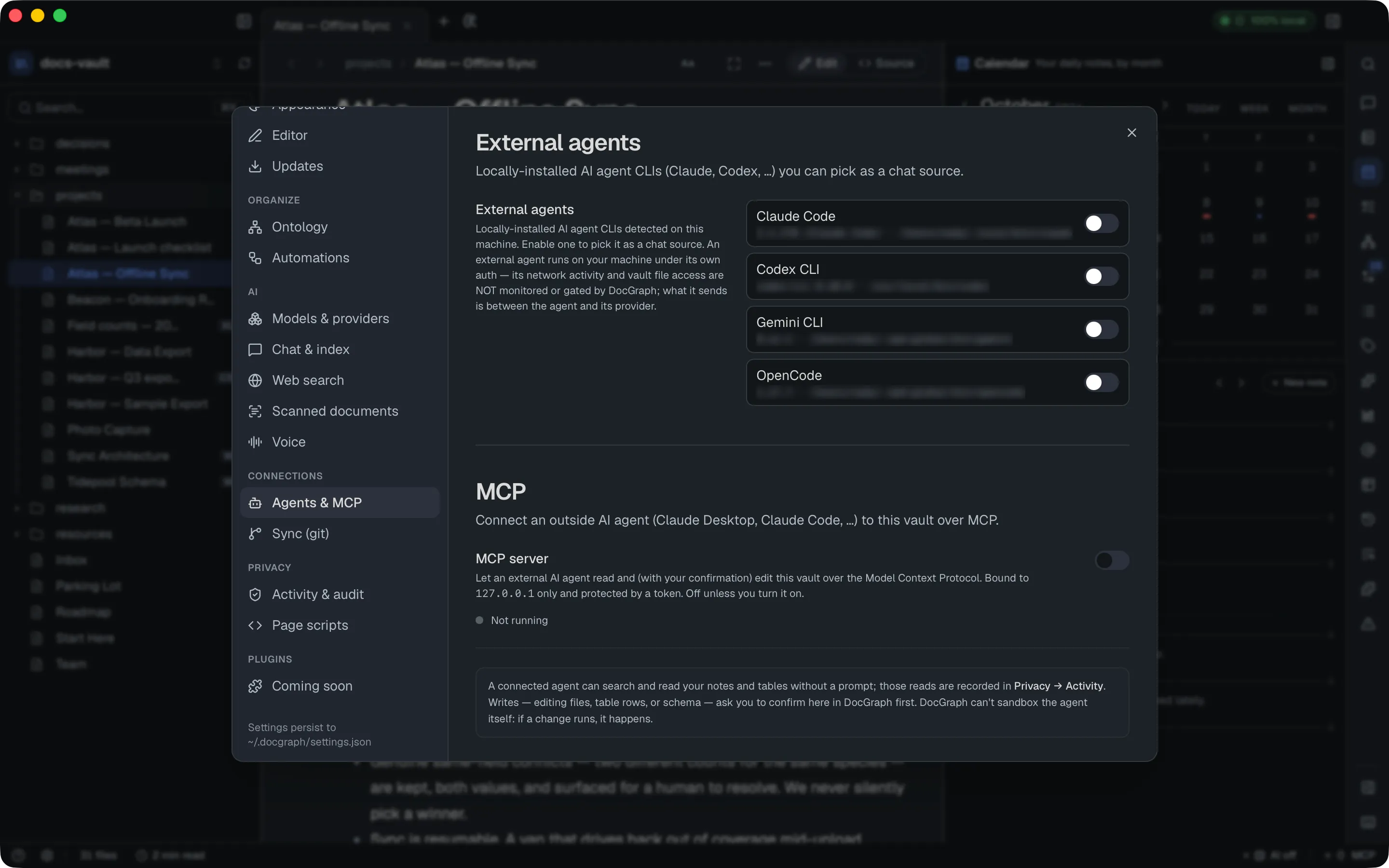
Off by default, bound to 127.0.0.1 only, and protected by a bearer token you can copy or rotate — rotating invalidates the old token immediately. Auto-approve routine edits skips the confirmation prompt for everyday writes (notes, table rows, tags, queries, charts); deleting or restructuring something always asks regardless.
Sync (git)
Section titled “Sync (git)”Version history is git-backed and local; it is off until you turn it on once per vault, from the History panel or with Start versioning this vault here (see Version History). This section adds the optional part on top: backing up to a remote you control. Here you save the Remote URL, Test connection, Push (back up), Pull (get latest), sign in with a token if you need one, and use the Danger zone to remove the remote or delete the local repository — which deletes all version history. Testing, pushing and pulling all show on the privacy badge and are logged to Activity. Each task is explained step by step in Sync & updates.
Privacy
Section titled “Privacy”Activity & audit
Section titled “Activity & audit”Activity — a durable, three-way log (Network / AI / Index) of what DocGraph itself has done: every outbound network call with host and byte count, every AI invocation and which files it read, and per-file index coverage:
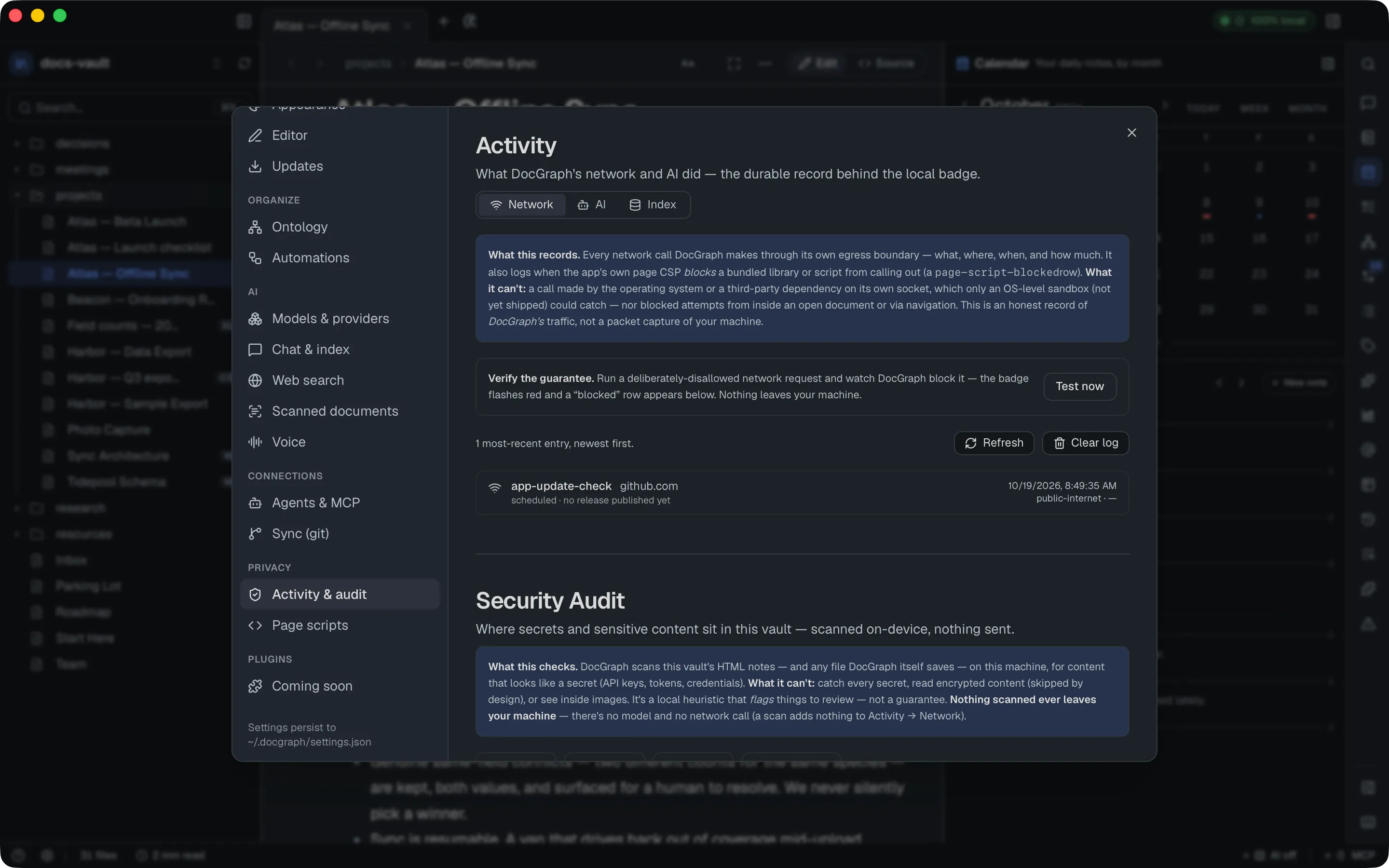
The Network log also records each time the app’s own page security policy blocks a bundled library or script from calling out, as a Page script blocked (CSP) row.
The Network and AI tabs each have Refresh and Clear log. Clearing asks you to confirm and can’t be undone; clearing the AI log does not delete your chats or notes.
There’s a Test now button that fires a deliberately-disallowed request so you can watch DocGraph’s own egress boundary block it in real time. See Activity log.
Security Audit, below Activity — scans your vault, entirely on-device, for content that looks like a secret (API keys, tokens, credentials) — nothing scanned is ever sent anywhere:
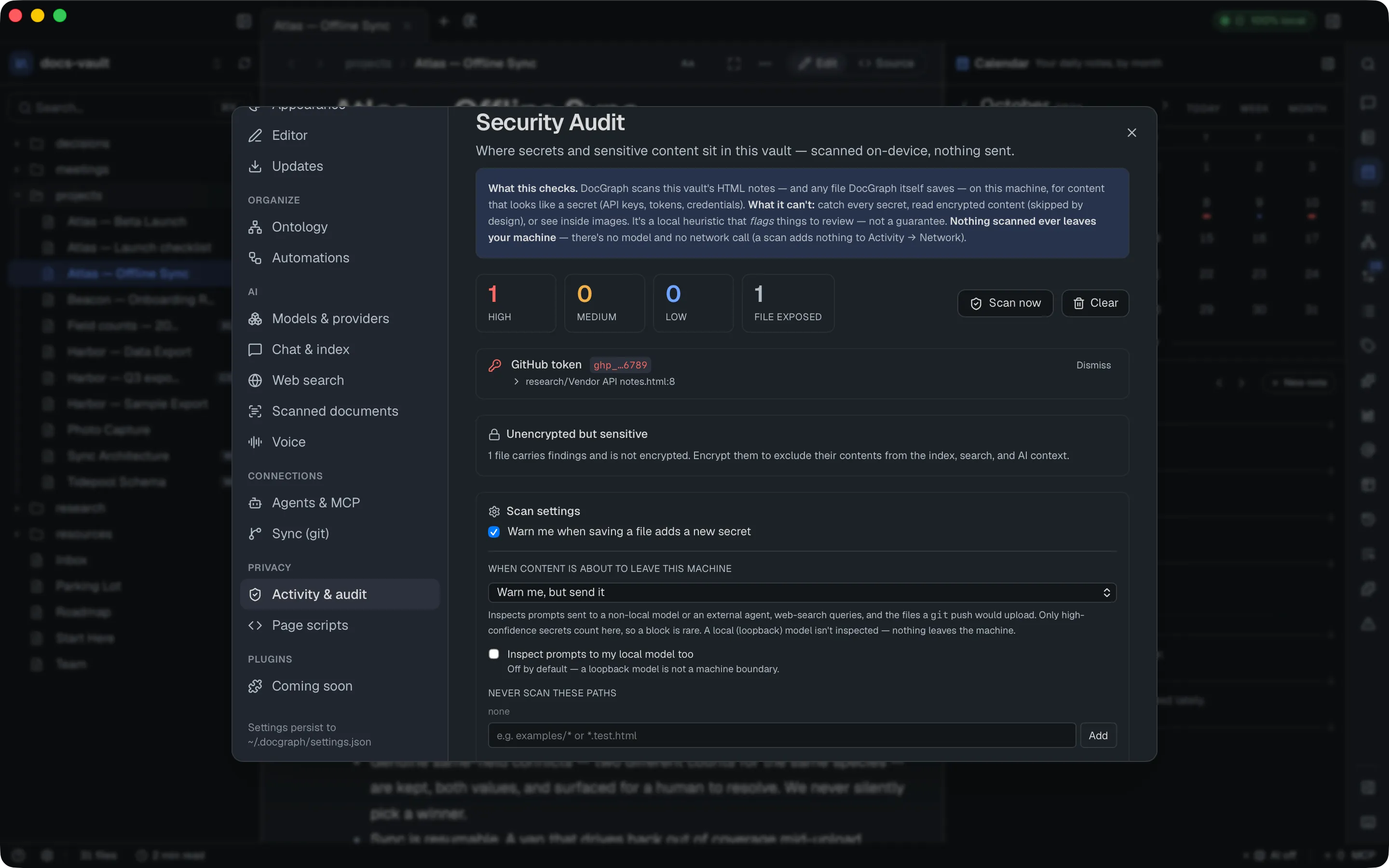
The “When content is about to leave this machine” control is a separate, related check: it inspects prompts sent to a non-local model, web-search queries, prompts handed to an external agent, and files a git push would upload — for high-confidence secrets only — and can be set to not inspect, warn but send, or block. A purely local model isn’t inspected unless you turn on Inspect prompts to my local model too, because nothing is leaving the machine. See Secrets & leak protection.
Page scripts
Section titled “Page scripts”Two per-vault, off-by-default trust decisions for this vault’s own HTML content:
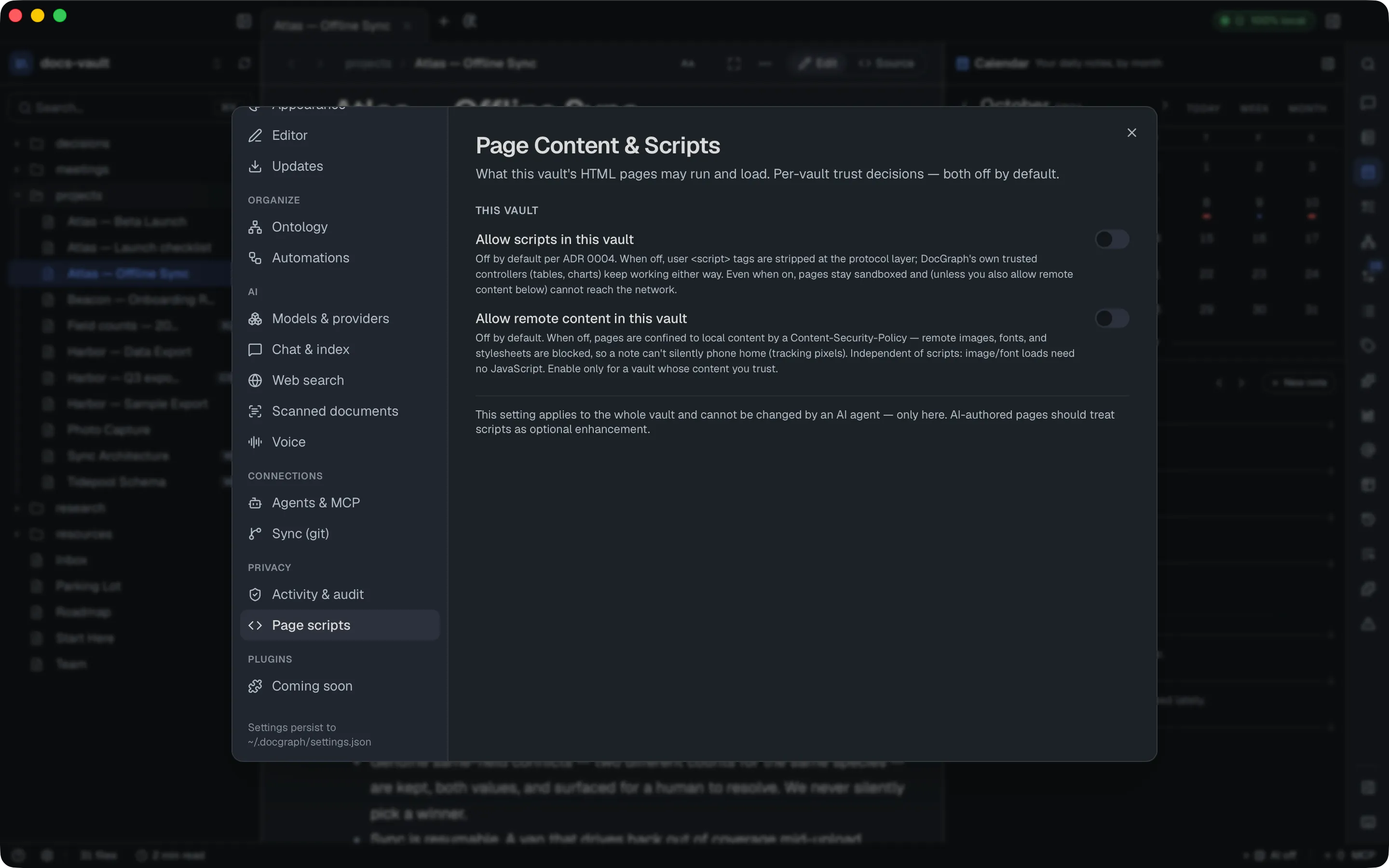
“Allow scripts” controls whether a note’s own <script> tags run (DocGraph’s built-in table/chart controllers work either way). “Allow remote content” controls whether pages can load remote images, fonts, or stylesheets — off by default so a note can’t silently phone home via a tracking pixel. Neither can be changed by an AI agent. See Pages you open.
Plugins
Section titled “Plugins”Third-party plugins are coming in a later release. For now this group has a single Coming soon page that says so; Graph, Problems and Vault Map are built in. See Plugins.
Reference
Section titled “Reference”| Section | Group | Default |
|---|---|---|
| Vault | General | Five system-wide shortcuts on (⌥Space, ⌃⌥K, ⌃⌥D, ⌃⌥N, ⌃⌥T); the rest off; clipboard prefill on; stamp lines in new notes off |
| Appearance | General | System theme, Compact density, 100% interface size; note extensions hidden; side panels: show all; keep running in the menu bar on |
| Editor | General | Block highlights off; reveal syntax at the caret on; auto-pair markdown syntax on; dates and times match your system; single-host Markdown on |
| Updates | General | Automatic check (shortly after launch, then daily) on for a new install; release notes after an update on |
| Ontology | Organize | Built-in defaults; no file until you change something |
| Automations | Organize | No rules |
| Models & providers | AI | AI features off; no provider allowed; secret blocking on |
| Chat & index | AI | TL;DR on; completions off; remote Ollama off; model kept in memory 30 min; no search language chosen; rerank on |
| Web search | AI | Off |
| Scanned documents | AI | On (macOS 13 or later); ask per file; pause on battery |
| Voice | AI | Off |
| Agents & MCP | Connections | All detected agents off; MCP server off; auto-approve off |
| Sync (git) | Connections | Not configured |
| Activity & audit | Privacy | Save warning on; egress inspection: warn |
| Page scripts | Privacy | Both toggles off |
| Coming soon | Plugins | — |