Connect an External Agent (MCP)
DocGraph can act as an MCP server: an outside AI agent — Claude Code, Claude Desktop, Codex, Cursor, Gemini CLI — connects to your open vault and gets the same tools DocGraph’s own assistant uses in Agent Mode — every one except its web-search pair. It can search your notes, read files, follow links, query tables, and (with your confirmation) write.
This is the reverse of the chat panel. There, DocGraph drives a model. Here, an outside agent drives DocGraph.
Getting there
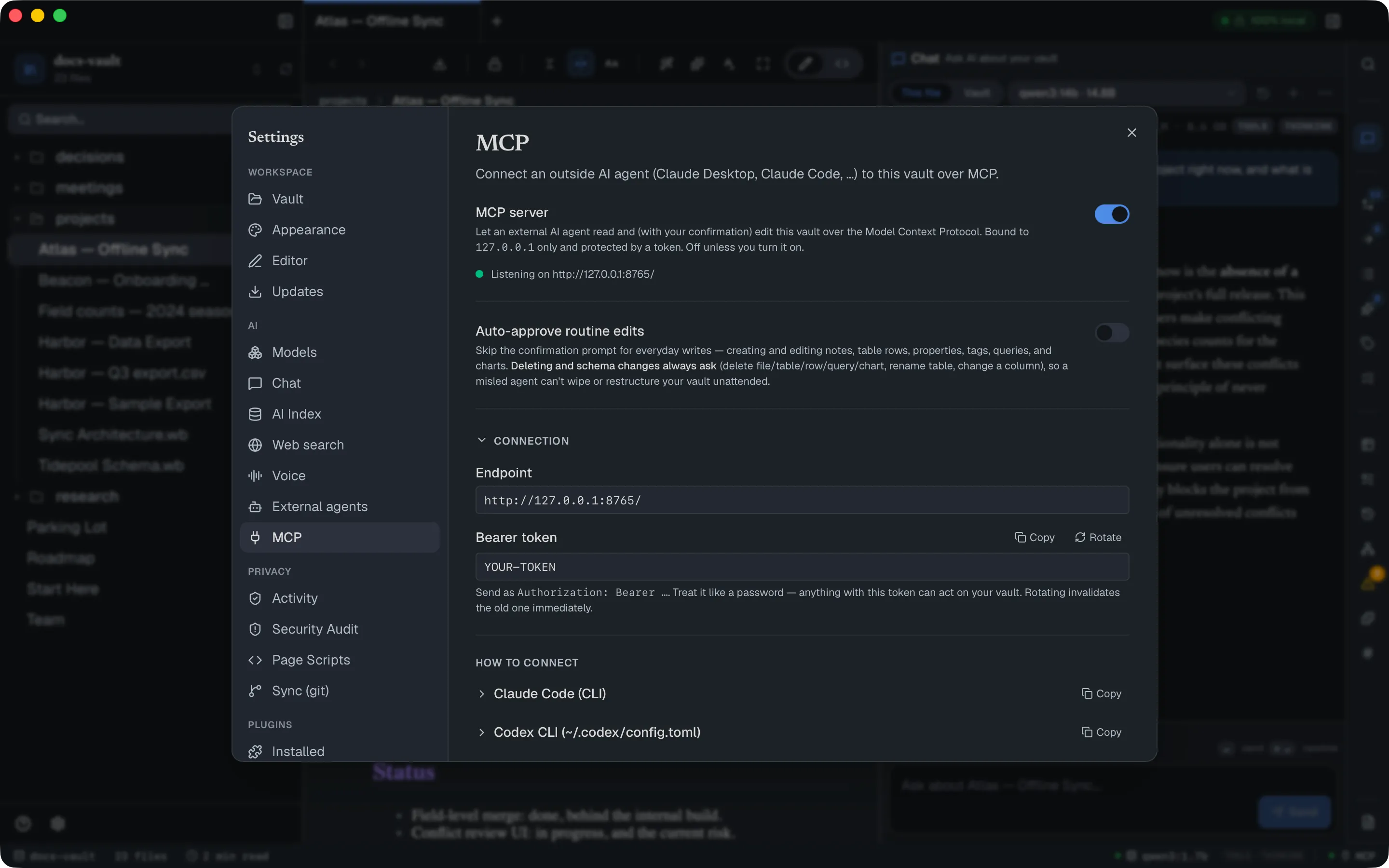
Section titled “Getting there”Settings → Connections → Agents & MCP, in the MCP section. It is off by default.
Turning it on the first time asks you to confirm, in a dialog that spells out what you’re allowing: an external agent can read any file in this vault, modify or delete files, and send what it reads to its own model provider. That last point is the one to think about — an agent running against a cloud model will ship your notes to that cloud, and this is outside anything DocGraph can inspect or block.
Once on, the server listens on http://127.0.0.1:8765/. It is loopback-only and cannot be reached from another machine or from a web page.
Core tasks
Section titled “Core tasks”Connect a client
Section titled “Connect a client”Every client needs two things: the endpoint and a bearer token. Both are in the Connection section, and the token has a Copy button next to it.
The app generates a ready-to-paste snippet for every supported client. Replace <YOUR-TOKEN> below with the value from the app:
Claude Code
claude mcp add --scope user --transport http docgraph http://127.0.0.1:8765/ --header "Authorization: Bearer <YOUR-TOKEN>"--scope user registers it globally, so it loads in every Claude Code session regardless of which folder you started in.
Claude Code plugin — the same connection plus a /docgraph skill that turns your project’s migrations or ORM models into an ERD, draws architecture and flow diagrams, and edits existing boards. Install steps and everything it can do are on The /docgraph Skill for Claude Code.
Claude Desktop and other stdio-only clients need a bridge:
{ "mcpServers": { "docgraph": { "command": "npx", "args": [ "-y", "mcp-remote", "http://127.0.0.1:8765/", "--header", "Authorization: Bearer <YOUR-TOKEN>" ] } }}Codex, Gemini CLI, Cursor and VS Code all speak HTTP directly — their exact config blocks are in the app under How to connect. Any client that speaks Streamable HTTP can connect straight to the endpoint with an Authorization: Bearer header; mcp-remote is only for stdio-only clients.
Author a diagram from Claude Code
Section titled “Author a diagram from Claude Code”The three board tools — create_board, read_board, edit_board — let a connected agent draw on a whiteboard the same way it edits a note. You describe the diagram; the agent fills in the tool call; DocGraph lays it out. There are no pixel coordinates anywhere in the exchange.
With DocGraph registered in Claude Code, a prompt like this is enough:
In DocGraph, create an ERD at diagrams/shop-erd.wb with three tables:users (id uuid pk, email, created_at), orders (id pk, user_id fk → users.id,total_cents, placed_at) and order_items (id pk, order_id fk → orders.id,sku, qty). Mark the FK sides as many-to-one and frame them as "Shop schema".Claude calls create_board with a semantic description — a table node per entity, its columns (each with a free-text type and an optional pk/fk marker), one edge per foreign key anchored by sourceColumn and targetColumn, crow’s-foot sourceCard/targetCard values (one, many, zero-or-one, one-or-many, zero-or-many), and a frame named “Shop schema” around the lot — the name shows in the frame’s top-left corner. The confirmation modal shows the full arguments; Approve writes the file and it opens like any ERD you drew by hand.
Follow-ups edit the same file. “Add a payments table linked to orders” makes the agent call read_board to learn the existing node ids, then edit_board with add_node and connect ops. Untouched tables keep their positions; ask for a relayout if the board gets crowded. read_board lists frames by id and name too, so “rename the frame to Billing” is a relabel op on the frame’s id, and add_frame draws a new named frame around existing nodes.
The same tools cover every other diagram type the whiteboard supports: flowcharts from shape nodes (rectangle, diamond, cylinder, hexagon and so on), architecture and business diagrams from infra nodes (server, database, queue, cache, load balancer, user, payment, milestone, …), free text and label nodes, and noteLink nodes that point back into the vault. Freehand ink and images are the two things an agent cannot author; add those by hand.
Approve what the agent writes
Section titled “Approve what the agent writes”Reads happen silently. Writes stop and ask you, in a modal over the app, showing the tool name and the full arguments:
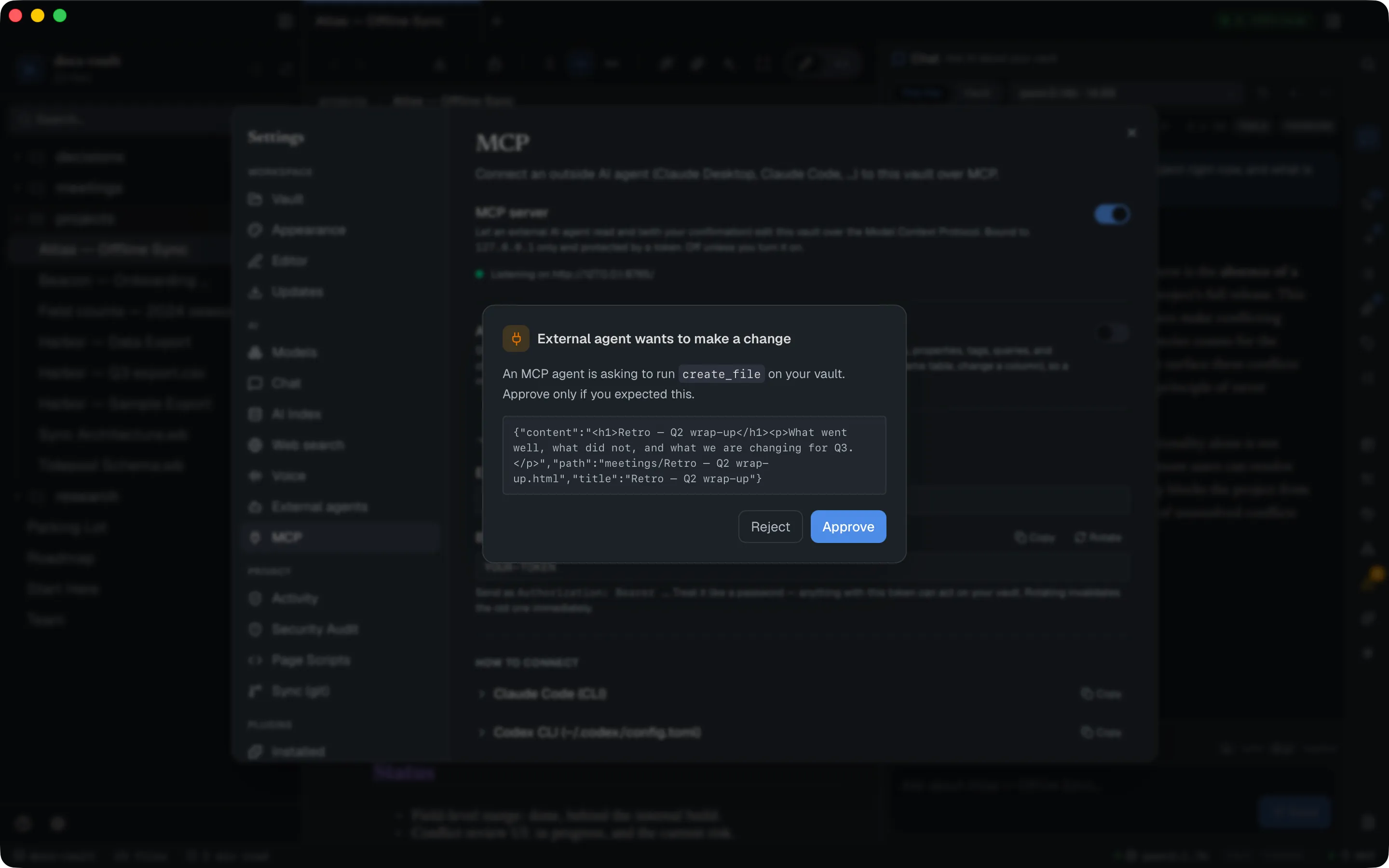
Reject returns an error to the agent (“The user declined to approve this tool in DocGraph.”) and nothing is written. If several requests arrive at once they queue, and the modal says how many are waiting.
Skip the prompt for routine edits
Section titled “Skip the prompt for routine edits”Auto-approve routine edits removes the confirmation for everyday writes: creating and editing notes, table rows, properties, tags, queries and charts.
These always ask, even with auto-approve on. Every delete_* tool — delete_file, delete_folder, delete_table, delete_row, delete_property, delete_query, delete_chart — and rename_table, update_column, rename_file, move_folder, propose_memory and set_block_props. Other writes are auto-approved, including edit_file and remove_from_search. rename_file and move_folder are there because relocating a document rewrites every link that pointed at it; propose_memory because a remembered line is read into every later chat, and set_block_props because one call can change properties in many files.
Arming it requires ticking a checkbox each time, because the risk is real and specific: a prompt-injected or misled agent will be able to alter your vault unattended.
See what it did
Section titled “See what it did”Every tool call is recorded in Settings → Privacy → Activity & audit, on the AI tab — including calls you rejected:
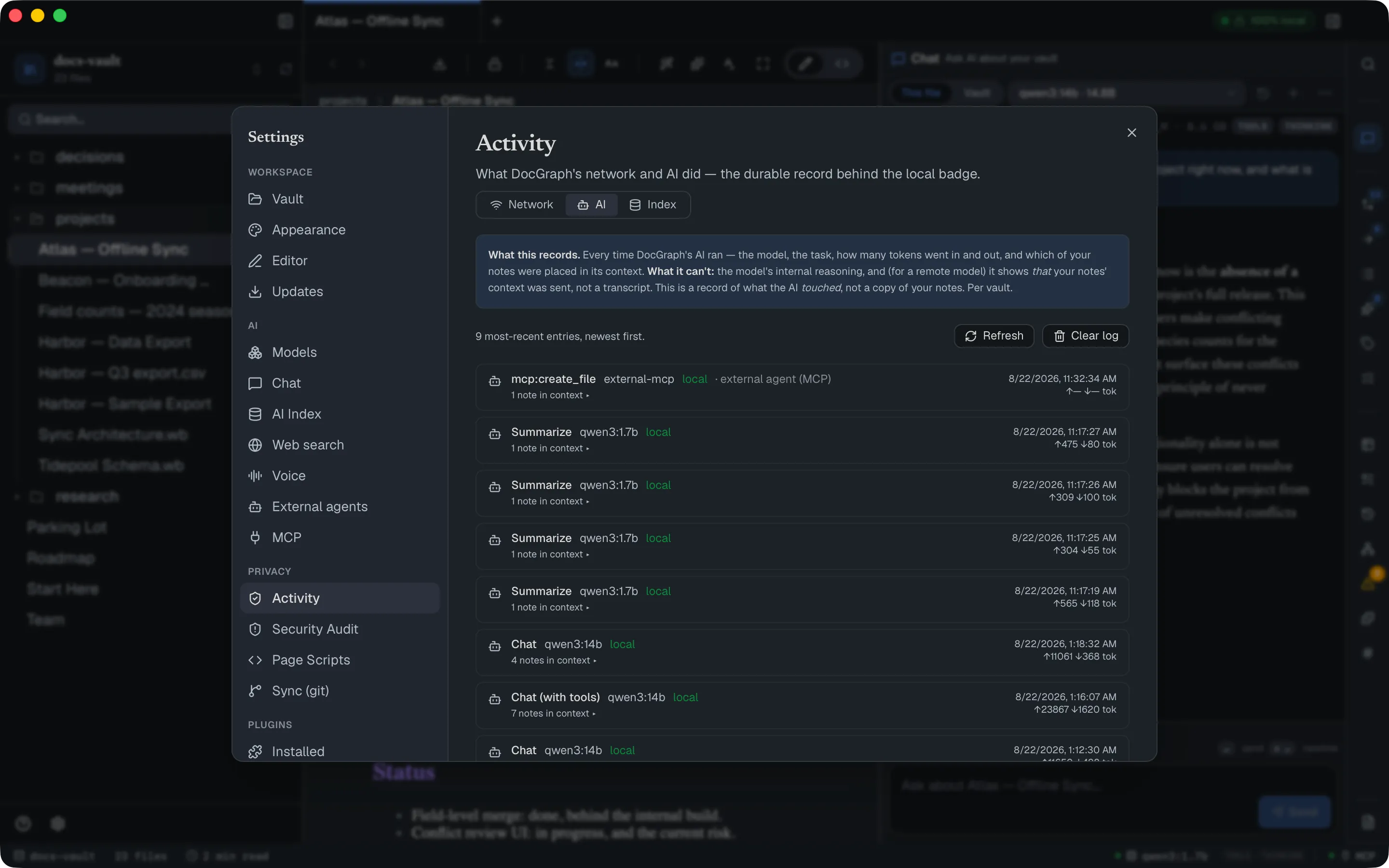
Rows show as mcp:<tool name> with the model column reading external-mcp. Only metadata is kept — which tool, when, and which file it touched — never your note contents. The status bar also carries an MCP indicator whose dot shows whether the server is running.
Reference
Section titled “Reference”The tools an agent gets
Section titled “The tools an agent gets”87 in total — exactly the in-app assistant’s Agent Mode set minus its web-search pair (web_search, and propose_web_search, which offers to turn it on). 43 read-only tools run without asking; 44 write tools are confirmation-gated. Every tool is listed in Every AI tool.
| Group | Count | Examples |
|---|---|---|
| Read / auto-run | 43 | search_vault, read_file, get_note_context, read_spreadsheet, list_backlinks, graph_neighbors, run_graph_query, query_table, query_source, run_saved_query, get_ontology, read_memory, get_outline, read_board, validate_page, docgraph_help |
| Write / gated | 44 | create_file, edit_file, append_to_file, apply_tags, insert_row, create_table, save_query, create_chart, create_board, edit_board, create_folder, make_searchable, propose_memory, delete_table |
With auto-approve on, routine writes run without a prompt, but deletes, file renames, folder moves, table schema changes (rename_table, update_column), propose_memory (a line the assistant will remember in every chat) and set_block_props always ask.
query_source reads the vault’s own data — tasks, notes, tags, people, dates, links and page properties — so an agent can answer “what is due this week” without a saved query having to exist first.
The write tools are built around HTML pages. On a .md note, edit_file (find and replace) works as usual, but create_file builds a new note as an HTML page — a .md note only comes out as Markdown when the agent supplies the file’s full content — and validate_page checks HTML pages only.
Web search is deliberately not exposed over MCP — a connected agent has its own.
Connection facts
Section titled “Connection facts”| Endpoint | http://127.0.0.1:8765/ (POST only) |
| Transport | Streamable HTTP, JSON-RPC 2.0 |
| Auth | Authorization: Bearer <token> |
| Token stored at | ~/.docgraph/mcp-token, permissions 0600 |
| Port | Fixed, not configurable |
| Confirmation timeout | 120 seconds, then treated as a rejection |
| Request limits | 8 MB body, 64 KB headers, 30 s socket read |
Limits & troubleshooting
Section titled “Limits & troubleshooting”“Enabled but not bound (port in use? see logs)”. Something else holds port 8765. The port isn’t configurable, so free it and toggle the server off and on.
Every call fails with “No vault is open in DocGraph.” The server is in-process and acts on the currently open vault. Open one.
The agent hangs, then reports a rejection you never made. The confirmation modal has a 120-second timeout that fails closed. If DocGraph was minimised or on another desktop when the request arrived, nobody saw the prompt and it expired — and the agent can’t tell that apart from a real rejection. Keep the app visible while an agent is working.
Rotating the token breaks connected clients. The old value dies on the next request. Re-run the config command with the new token.
Undoing an agent’s change. A write made through MCP goes on the same undo stack as the chat panel’s own AI edits, so ↩ Undo last AI change in the chat reverts the most recent one. Not every kind of change can be undone that way (table rows and columns, page properties set with set_property, new saved queries and charts, and git snapshots can’t), so version history is still your safety net — commit a version before letting an agent work unattended.
DocGraph does not inspect what the agent sends onward. The secret-detection that guards outbound traffic covers DocGraph’s own network calls. Once an agent has read a file over MCP, what it does with that text is between it and its provider.
Your client shows a 405 for GET. Expected — the server is POST-only and has no SSE channel. Clients that insist on one need the mcp-remote bridge.